
TRL documentation
Distributing Training
Distributing Training
Section under construction. Feel free to contribute!
Multi-GPU Training with TRL
The trainers in TRL use 🤗 Accelerate to enable distributed training across multiple GPUs or nodes. To do so, first create an 🤗 Accelerate config file by running
accelerate config
and answering the questions according to your multi-GPU / multi-node setup. You can then launch distributed training by running:
accelerate launch train.py
We also provide config files in the examples folder that can be used as templates. To use these templates, simply pass the path to the config file when launching a job, e.g.:
accelerate launch --config_file examples/accelerate_configs/multi_gpu.yaml train.py <SCRIPT_ARGS>
This automatically distributes the workload across all available GPUs.
Under the hood, 🤗 Accelerate creates one model per GPU. Each process:
- Processes its own batch of data
- Computes the loss and gradients for that batch
- Shares gradient updates across all GPUs
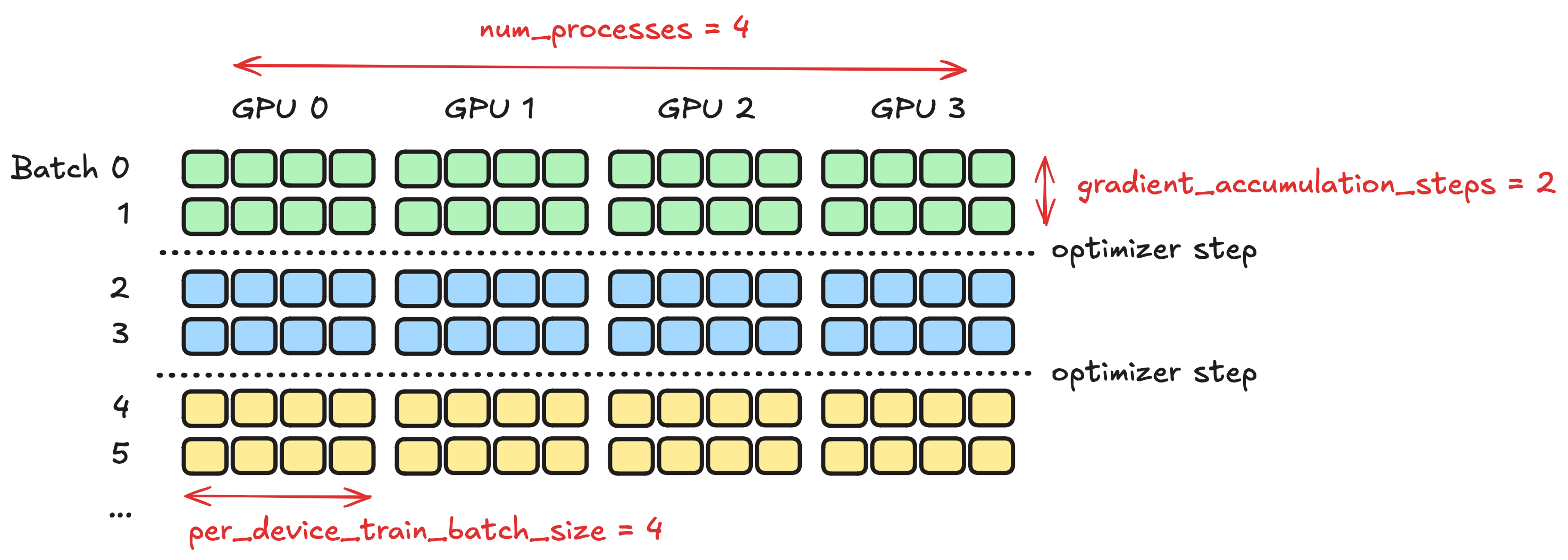
The effective batch size is calculated as:
To maintain a consistent batch size when scaling to multiple GPUs, make sure to update per_device_train_batch_size and gradient_accumulation_steps accordingly.
Example, these configurations are equivalent, and should yield the same results:
| Number of GPUs | Per device batch size | Gradient accumulation steps | Comments |
|---|---|---|---|
| 1 | 32 | 1 | Possibly high memory usage, but faster training |
| 1 | 4 | 8 | Lower memory usage, slower training |
| 8 | 4 | 1 | Multi-GPU to get the best of both worlds |
Having one model per GPU can lead to high memory usage, which may not be feasible for large models or low-memory GPUs. In such cases, you can leverage DeepSpeed, which provides optimizations like model sharding, Zero Redundancy Optimizer, mixed precision training, and offloading to CPU or NVMe. Check out our DeepSpeed Integration guide for more details.
Training on very long sequences has its own guide: Training Beyond 1M Tokens.
Multi-Node Training
When a single machine doesn’t have enough GPUs, TRL can scale training across multiple machines (nodes) using 🤗 Accelerate.
Accelerate Configuration
Create an accelerate config file (e.g., multi_node.yaml) for multi-node training. Key fields:
compute_environment: LOCAL_MACHINE
distributed_type: MULTI_GPU
num_machines: 2
machine_rank: 0  # 0 for main node, 1 for second node
main_process_ip: 10.0.0.1  # IP of rank 0 node
main_process_port: 29500
num_processes: 16  # total processes across nodes
mixed_precision: bf16
use_cpu: false
same_network: true
Adjust num_processes to match the total number of GPUs across all nodes.
Replace
10.0.0.1with the actual IP address of the rank 0 (main) node.
Launching
Option 1: Manual Launch (Non-HPC)
Run the following on each node manually:
# Node 0 (main node)
accelerate launch --config_file multi_node.yaml --machine_rank 0 train.py

# Node 1
accelerate launch --config_file multi_node.yaml --machine_rank 1 train.py
Option 2: SLURM Launch (HPC Clusters)
For clusters using SLURM job scheduler, create a job script (e.g., slurm_job.sh):
#!/bin/bash
#SBATCH --nodes=2
#SBATCH --gpus-per-node=8
#SBATCH --job-name=trl_multi

srun accelerate launch --config_file multi_node.yaml train.py
Then submit the job:
sbatch slurm_job.sh
SLURM automatically distributes the training across all requested nodes and GPUs, and srun configures the necessary environment variables for multi-node communication.
Key SLURM directives:
--nodes=2: Request 2 compute nodes--gpus-per-node=8: Allocate 8 GPUs per node (16 total)--job-name: Label for tracking in the job queue
You can combine multi-node with DeepSpeed by setting distributed_type: DEEPSPEED and adding a deepspeed_config block. See the DeepSpeed integration guide.
Further Reading
- Accelerate: Launching Scripts
- Accelerate: Example Zoo
- SLURM Workload Manager Documentation - For cluster job scheduling