
Transformers documentation
Grounding DINO
该模型于 2023-03-09 在 HF papers 上发布,并于 2024-04-11 贡献至 Hugging Face Transformers。
Grounding DINO
概述
Grounding DINO 模型由 Shilong Liu、Zhaoyang Zeng、Tianhe Ren、Feng Li、Hao Zhang、Jie Yang、Chunyuan Li、Jianwei Yang、Hang Su、Jun Zhu 和 Lei Zhang 在 Grounding DINO: Marrying DINO with Grounded Pre-Training for Open-Set Object Detection 中提出。Grounding DINO 通过为闭集目标检测模型添加文本编码器,实现了开放集目标检测。该模型取得了显著的成果,例如在 COCO 零样本任务上达到了 52.5 AP。
该论文的摘要如下:
本文提出了一种名为 Grounding DINO 的开放集目标检测器,它将基于 Transformer 的检测器 DINO 与基于文本的预训练相结合,能够根据类别名称或指代表达式等人类输入检测任意目标。开放集目标检测的关键在于向闭集检测器引入语言,以实现开放集概念的泛化。为了有效融合语言和视觉模态,我们在概念上将闭集检测器划分为三个阶段,并提出了一种紧密融合方案,其中包括特征增强器、语言引导的查询选择以及用于跨模态融合的跨模态解码器。尽管以往的工作主要在新型类别上评估开放集目标检测,我们建议针对具有属性指定的目标,也进行指代表达式理解的评估。Grounding DINO 在所有三种设置下均表现出色,包括在 COCO、LVIS、ODinW 和 RefCOCO/+/g 上的基准测试。Grounding DINO 在 COCO 检测零样本迁移基准上取得了 52.5 AP 的成绩,即未使用任何来自 COCO 的训练数据。它在 ODinW 零样本基准上创下了新纪录,平均 AP 达到 26.1。
 Grounding DINO overview. Taken from the original paper.
该模型由 EduardoPacheco 和 nielsr 贡献。 原始代码可在此处找到。
使用技巧
- 可以使用 GroundingDinoProcessor 为模型准备图像-文本对。
- 要在文本中分隔类别,请使用句号,例如“a cat. a dog.”
- 当使用多个类别(例如
"a cat. a dog.")时,请使用 GroundingDinoProcessor 中的post_process_grounded_object_detection对输出进行后处理。因为post_process_object_detection返回的标签表示模型维度中 prob > threshold 的索引。
以下是如何使用该模型进行零样本目标检测:
import requests

import torch
from PIL import Image
from transformers import AutoProcessor, AutoModelForZeroShotObjectDetection

model_id = "IDEA-Research/grounding-dino-tiny"

processor = AutoProcessor.from_pretrained(model_id)
model = AutoModelForZeroShotObjectDetection.from_pretrained(model_id, device_map="auto")

image_url = "http://images.cocodataset.org/val2017/000000039769.jpg"
image = Image.open(requests.get(image_url, stream=True).raw)
# Check for cats and remote controls
text_labels = [["a cat", "a remote control"]]

inputs = processor(images=image, text=text_labels, return_tensors="pt").to(model.device)
with torch.no_grad():
    outputs = model(**inputs)

results = processor.post_process_grounded_object_detection(
    outputs,
    inputs.input_ids,
    threshold=0.4,
    text_threshold=0.3,
    target_sizes=[image.size[::-1]]
)

# Retrieve the first image result
result = results[0]
for box, score, labels in zip(result["boxes"], result["scores"], result["labels"]):
    box = [round(x, 2) for x in box.tolist()]
    print(f"Detected {labels} with confidence {round(score.item(), 3)} at location {box}")
Detected a cat with confidence 0.468 at location [344.78, 22.9, 637.3, 373.62]
Detected a cat with confidence 0.426 at location [11.74, 51.55, 316.51, 473.22]
Grounded SAM
可以将 Grounding DINO 与 Segment Anything 模型结合,以实现基于文本的掩码生成,如 Grounded SAM: Assembling Open-World Models for Diverse Visual Tasks 中所述。有关详细信息,请参阅此 演示笔记本 🌍。
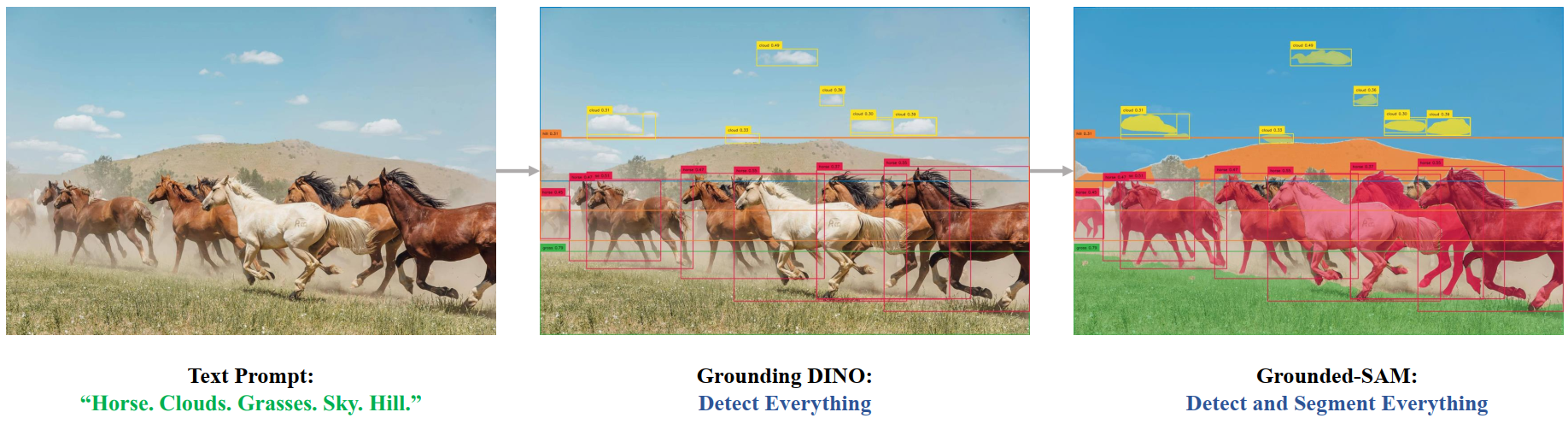 Grounded SAM overview. Taken from the original repository.
资源
一份来自 Hugging Face 官方和社区(以 🌎 标识)的资源列表,帮助你快速上手 Grounding DINO。如果你希望提交资源以收录在此处,欢迎随时发起 Pull Request,我们将进行审核!该资源最好能展示一些新内容,而不是重复已有的资源。
GroundingDinoImageProcessor
class transformers.GroundingDinoImageProcessor
< source >( **kwargs: *<class 'transformers.models.grounding_dino.image_processing_grounding_dino.GroundingDinoImageProcessorKwargs'> )
参数
- do_convert_rgb (
bool,kwargs,可选) — 是否将图像转换为 RGB。 - do_resize (
bool,kwargs,可选,默认为True) — 是否调整图像大小。 - size (
Annotated[int | list[int] | tuple[int, ...] | dict[str, int] | None, None], kwargs,默认为{'shortest_edge' -- 800, 'longest_edge': 1333}): 描述输入到模型的最大尺寸。 - default_to_square (
bool,kwargs,可选,默认为False) — 当 size 为 int 时,是否在调整大小时默认使用正方形图像。 - crop_size (
Annotated[int | list[int] | tuple[int, ...] | dict[str, int] | None, None], kwargs) — 应用center_crop后输出图像的尺寸。 - resample (
Annotated[Union[int, PILImageResampling, NoneType], None], kwargs,默认为2) — 如果调整图像大小,则使用的重采样滤波器。它可以是枚举PILImageResampling中的一个值。仅当do_resize设置为True时才会生效。 - do_rescale (
bool,kwargs,可选,默认为True) — 是否对图像进行重新缩放。 - rescale_factor (
float,kwargs,可选,默认为0.00392156862745098) — 当do_rescale设置为True时,用于对图像进行缩放的缩放因子。 - do_normalize (
bool,kwargs,可选,默认为True) — 是否对图像进行归一化。 - image_mean (
Union[float, list[float], tuple[float, ...]],kwargs,可选,默认为[0.485, 0.456, 0.406]) — 用于归一化的图像均值。仅当do_normalize设置为True时生效。 - image_std (
Union[float, list[float], tuple[float, ...]],kwargs,可选,默认为[0.229, 0.224, 0.225]) — 用于归一化的图像标准差。仅当do_normalize设置为True时生效。 - do_pad (
bool,kwargs,可选,默认为True) — 是否对图像进行填充。填充操作会将图像填充至批次中的最大尺寸,或填充至每张图像的固定正方形尺寸。具体的填充策略取决于模型。 - pad_size (
Annotated[int | list[int] | tuple[int, ...] | dict[str, int] | None, None], kwargs) — 用于填充图像的{"height": int, "width" int}尺寸。必须大于为预处理提供的任何图像尺寸。如果未提供pad_size,图像将被填充到批次中最大的高度和宽度。仅在do_pad=True.时应用。 - do_center_crop (
bool,kwargs,可选) — 是否对图像进行中心裁剪。 - data_format (
Union[str, ~image_utils.ChannelDimension], kwargs, 可选) — 仅支持ChannelDimension.FIRST。为兼容旧版处理器而添加。 - input_data_format (
Union[str, ~image_utils.ChannelDimension], kwargs, 可选) — 输入图像的通道维度格式。如果未设置,则从输入图像中推断通道维度格式。可以是以下之一:"channels_first"或ChannelDimension.FIRST:图像采用 (num_channels, height, width) 格式。"channels_last"或ChannelDimension.LAST:图像采用 (height, width, num_channels) 格式。"none"或ChannelDimension.NONE:图像为 (height, width) 格式。
- device (
Annotated[Union[str, torch.device, NoneType], None], kwargs) — 用于处理视频的设备。如果未设置,则从输入视频中推断设备。 - return_tensors (
Annotated[str | ~utils.generic.TensorType | None, None], kwargs) — 如果设置为'pt',则返回堆叠的张量,否则返回张量列表。 - disable_grouping (
bool,kwargs,可选) — 是否禁用按尺寸对图像进行分组,从而逐个处理图像而非批量处理。 如果为 None,则当图像位于 CPU 上时设置为 True,否则设置为 False。此选择基于经验观察,详见此处:https://github.com/huggingface/transformers/pull/38157 - image_seq_length (
int,kwargs,可选) — 输入中每张图片所使用的图像 token 数量。 为向后兼容而添加,但在未来的模型中,应将其设置为处理器的属性。 - format (
str, kwargs, optional, 默认为AnnotationFormat.COCO_DETECTION) — 标注的数据格式。取值为 “coco_detection” 或 “coco_panoptic” 之一。 - do_convert_annotations (
bool,kwargs,可选,默认为True) — 控制是否将标注转换为 GROUNDING_DINO 模型所期望的格式。将边界框转换为(center_x, center_y, width, height)格式,且取值范围为[0, 1]。 可以通过preprocess方法中的do_convert_annotations参数进行覆盖。
构建一个 GroundingDinoImageProcessor 图像处理器。
预处理
< source >( images: typing.Union[ForwardRef('PIL.Image.Image'), numpy.ndarray, ForwardRef('torch.Tensor'), list['PIL.Image.Image'], list[numpy.ndarray], list['torch.Tensor']]annotations: dict[str, int | str | list[dict]] | list[dict[str, int | str | list[dict]]] | None = Nonereturn_segmentation_masks: bool | None = Nonemasks_path: str | pathlib.Path | None = None**kwargs: *<class 'transformers.models.grounding_dino.image_processing_grounding_dino.GroundingDinoImageProcessorKwargs'> ) → ~image_processing_base.BatchFeature
参数
- images (
Union[PIL.Image.Image, numpy.ndarray, torch.Tensor, list[PIL.Image.Image], list[numpy.ndarray], list[torch.Tensor]]) — 要预处理的图像。期望输入单张图像或一批图像,其像素值范围为 0 到 255。如果传入的图像像素值在 0 到 1 之间,请设置do_rescale=False。 - annotations(
AnnotationType或list[AnnotationType],可选)— 根据应用于图像的填充进行转换的注释。 - return_segmentation_masks (
bool,可选,默认为self.return_segmentation_masks) — 是否返回分割掩码。 - masks_path (
str或pathlib.Path,可选) — 包含分割掩码的目录路径。 - do_convert_rgb (
bool,kwargs,可选) — 是否将图像转换为 RGB。 - do_resize (
bool,kwargs,可选) — 是否调整图像大小。 - size (
Annotated[int | list[int] | tuple[int, ...] | dict[str, int] | None, None], kwargs) — 描述模型的最大输入维度。 - default_to_square (
bool, kwargs, 可选) — 当 size 为整数时,是否在调整大小时默认使用正方形图像。 - crop_size (
Annotated[int | list[int] | tuple[int, ...] | dict[str, int] | None, None], kwargs) — 应用center_crop后输出图像的尺寸。 - resample (
Annotated[Union[int, PILImageResampling, NoneType], None], kwargs) — 如果调整图像大小,则使用的重采样滤波器。可以是枚举PILImageResampling中的一个值。仅当do_resize设置为True时生效。 - do_rescale (
bool,kwargs,可选) — 是否对图像进行重新缩放。 - rescale_factor (
float, kwargs, 可选) — 如果do_rescale设置为True,则用于对图像进行缩放的缩放因子。 - do_normalize (
bool,kwargs,可选) — 是否对图像进行归一化。 - image_mean (
Union[float, list[float], tuple[float, ...]], kwargs, 可选) — 用于归一化的图像均值。仅当do_normalize设置为True时生效。 - image_std (
Union[float, list[float], tuple[float, ...]], kwargs, 可选) — 用于归一化的图像标准差。仅当do_normalize设置为True时生效。 - do_pad (
bool, kwargs, 可选) — 是否对图像进行填充。填充操作会将图像填充至批次中的最大尺寸,或填充至每张图像的固定正方形尺寸。具体的填充策略取决于模型。 - pad_size (
Annotated[int | list[int] | tuple[int, ...] | dict[str, int] | None, None], kwargs) — 用于填充图像的{"height": int, "width" int}尺寸。必须大于为预处理提供的任何图像尺寸。如果未提供pad_size,图像将被填充到批次中最大的高度和宽度。仅在do_pad=True.时应用。 - do_center_crop (
bool,kwargs,可选) — 是否对图像进行中心裁剪。 - data_format (
Union[str, ~image_utils.ChannelDimension], kwargs, 可选) — 仅支持ChannelDimension.FIRST。为兼容旧版处理器而添加。 - input_data_format (
Union[str, ~image_utils.ChannelDimension], kwargs, 可选) — 输入图像的通道维度格式。如果未设置,则从输入图像中推断通道维度格式。可以是以下之一:"channels_first"或ChannelDimension.FIRST:图像采用 (num_channels, height, width) 格式。"channels_last"或ChannelDimension.LAST:图像采用 (height, width, num_channels) 格式。"none"或ChannelDimension.NONE:图像为 (height, width) 格式。
- device (
Annotated[Union[str, torch.device, NoneType], None], kwargs) — 用于处理视频的设备。如果未设置,则从输入视频中推断设备。 - return_tensors (
Annotated[str | ~utils.generic.TensorType | None, None], kwargs) — 如果设置为'pt',则返回堆叠的张量,否则返回张量列表。 - disable_grouping (
bool,kwargs,可选) — 是否禁用按尺寸对图像进行分组,从而逐个处理图像而非批量处理。 如果为 None,则当图像位于 CPU 上时设置为 True,否则设置为 False。此选择基于经验观察,详见此处:https://github.com/huggingface/transformers/pull/38157 - image_seq_length (
int,kwargs,可选) — 输入中每张图片所使用的图像 token 数量。 为向后兼容而添加,但在未来的模型中,应将其设置为处理器的属性。 - format (
str, kwargs, optional, 默认为AnnotationFormat.COCO_DETECTION) — 标注的数据格式。取值为 “coco_detection” 或 “coco_panoptic” 之一。 - do_convert_annotations (
bool,kwargs,可选,默认为True) — 控制是否将标注转换为 GROUNDING_DINO 模型所期望的格式。将边界框转换为(center_x, center_y, width, height)格式,且取值范围为[0, 1]。 可以通过preprocess方法中的do_convert_annotations参数进行覆盖。
返回值
~image_processing_base.BatchFeature
- data (
dict) — 由 call 方法返回的列表/数组/张量字典(如 ‘pixel_values’ 等)。 - tensor_type (
Union[None, str, TensorType], 可选) — 您可以在此处指定 tensor_type,以便在初始化时将 PyTorch/Numpy 张量中的整数列表进行转换。
GroundingDinoImageProcessorPil
class transformers.GroundingDinoImageProcessorPil
< source >( **kwargs: *<class 'transformers.models.grounding_dino.image_processing_pil_grounding_dino.GroundingDinoImageProcessorKwargs'> )
参数
- do_convert_rgb (
bool,kwargs,可选) — 是否将图像转换为 RGB。 - do_resize (
bool,kwargs,可选,默认为True) — 是否调整图像大小。 - size (
Annotated[int | list[int] | tuple[int, ...] | dict[str, int] | None, None], kwargs,默认为{'shortest_edge' -- 800, 'longest_edge': 1333}): 描述输入到模型的最大尺寸。 - default_to_square (
bool,kwargs,可选,默认为False) — 当 size 为 int 时,是否在调整大小时默认使用正方形图像。 - crop_size (
Annotated[int | list[int] | tuple[int, ...] | dict[str, int] | None, None], kwargs) — 应用center_crop后输出图像的尺寸。 - resample (
Annotated[Union[int, PILImageResampling, NoneType], None], kwargs,默认为2) — 如果调整图像大小,则使用的重采样滤波器。它可以是枚举PILImageResampling中的一个值。仅当do_resize设置为True时才会生效。 - do_rescale (
bool,kwargs,可选,默认为True) — 是否对图像进行重新缩放。 - rescale_factor (
float,kwargs,可选,默认为0.00392156862745098) — 当do_rescale设置为True时,用于对图像进行缩放的缩放因子。 - do_normalize (
bool,kwargs,可选,默认为True) — 是否对图像进行归一化。 - image_mean (
Union[float, list[float], tuple[float, ...]],kwargs,可选,默认为[0.485, 0.456, 0.406]) — 用于归一化的图像均值。仅当do_normalize设置为True时生效。 - image_std (
Union[float, list[float], tuple[float, ...]],kwargs,可选,默认为[0.229, 0.224, 0.225]) — 用于归一化的图像标准差。仅当do_normalize设置为True时生效。 - do_pad (
bool,kwargs,可选,默认为True) — 是否对图像进行填充。填充操作会将图像填充至批次中的最大尺寸,或填充至每张图像的固定正方形尺寸。具体的填充策略取决于模型。 - pad_size (
Annotated[int | list[int] | tuple[int, ...] | dict[str, int] | None, None], kwargs) — 用于填充图像的{"height": int, "width" int}尺寸。必须大于为预处理提供的任何图像尺寸。如果未提供pad_size,图像将被填充到批次中最大的高度和宽度。仅在do_pad=True.时应用。 - do_center_crop (
bool,kwargs,可选) — 是否对图像进行中心裁剪。 - data_format (
Union[str, ~image_utils.ChannelDimension], kwargs, 可选) — 仅支持ChannelDimension.FIRST。为兼容旧版处理器而添加。 - input_data_format (
Union[str, ~image_utils.ChannelDimension], kwargs, 可选) — 输入图像的通道维度格式。如果未设置,则从输入图像中推断通道维度格式。可以是以下之一:"channels_first"或ChannelDimension.FIRST:图像采用 (num_channels, height, width) 格式。"channels_last"或ChannelDimension.LAST:图像采用 (height, width, num_channels) 格式。"none"或ChannelDimension.NONE:图像为 (height, width) 格式。
- device (
Annotated[Union[str, torch.device, NoneType], None], kwargs) — 用于处理视频的设备。如果未设置,则从输入视频中推断设备。 - return_tensors (
Annotated[str | ~utils.generic.TensorType | None, None], kwargs) — 如果设置为'pt',则返回堆叠的张量,否则返回张量列表。 - disable_grouping (
bool,kwargs,可选) — 是否禁用按尺寸对图像进行分组,从而逐个处理图像而非批量处理。 如果为 None,则当图像位于 CPU 上时设置为 True,否则设置为 False。此选择基于经验观察,详见此处:https://github.com/huggingface/transformers/pull/38157 - image_seq_length (
int,kwargs,可选) — 输入中每张图片所使用的图像 token 数量。 为向后兼容而添加,但在未来的模型中,应将其设置为处理器的属性。 - format (
str, kwargs, optional, 默认为AnnotationFormat.COCO_DETECTION) — 标注的数据格式。取值为 “coco_detection” 或 “coco_panoptic” 之一。 - do_convert_annotations (
bool,kwargs,可选,默认为True) — 控制是否将标注转换为 GROUNDING_DINO 模型所期望的格式。将边界框转换为(center_x, center_y, width, height)格式,且取值范围为[0, 1]。 可以通过preprocess方法中的do_convert_annotations参数进行覆盖。
构建一个 GroundingDinoImageProcessor 图像处理器。
预处理
< source >( images: typing.Union[ForwardRef('PIL.Image.Image'), numpy.ndarray, ForwardRef('torch.Tensor'), list['PIL.Image.Image'], list[numpy.ndarray], list['torch.Tensor']]annotations: dict[str, int | str | list[dict]] | list[dict[str, int | str | list[dict]]] | None = Nonereturn_segmentation_masks: bool | None = Nonemasks_path: str | pathlib.Path | None = None**kwargs: *<class 'transformers.models.grounding_dino.image_processing_pil_grounding_dino.GroundingDinoImageProcessorKwargs'> ) → ~image_processing_base.BatchFeature
参数
- images (
Union[PIL.Image.Image, numpy.ndarray, torch.Tensor, list[PIL.Image.Image], list[numpy.ndarray], list[torch.Tensor]]) — 要预处理的图像。期望输入单张图像或一批图像,其像素值范围为 0 到 255。如果传入的图像像素值在 0 到 1 之间,请设置do_rescale=False。 - annotations(
AnnotationType或list[AnnotationType],可选)— 根据应用于图像的填充进行转换的注释。 - return_segmentation_masks (
bool,可选,默认为self.return_segmentation_masks) — 是否返回分割掩码。 - masks_path (
str或pathlib.Path,可选) — 包含分割掩码的目录路径。 - do_convert_rgb (
bool,kwargs,可选) — 是否将图像转换为 RGB。 - do_resize (
bool,kwargs,可选) — 是否调整图像大小。 - size (
Annotated[int | list[int] | tuple[int, ...] | dict[str, int] | None, None], kwargs) — 描述模型的最大输入维度。 - default_to_square (
bool, kwargs, 可选) — 当 size 为整数时,是否在调整大小时默认使用正方形图像。 - crop_size (
Annotated[int | list[int] | tuple[int, ...] | dict[str, int] | None, None], kwargs) — 应用center_crop后输出图像的尺寸。 - resample (
Annotated[Union[int, PILImageResampling, NoneType], None], kwargs) — 如果调整图像大小,则使用的重采样滤波器。可以是枚举PILImageResampling中的一个值。仅当do_resize设置为True时生效。 - do_rescale (
bool,kwargs,可选) — 是否对图像进行重新缩放。 - rescale_factor (
float, kwargs, 可选) — 如果do_rescale设置为True,则用于对图像进行缩放的缩放因子。 - do_normalize (
bool,kwargs,可选) — 是否对图像进行归一化。 - image_mean (
Union[float, list[float], tuple[float, ...]], kwargs, 可选) — 用于归一化的图像均值。仅当do_normalize设置为True时生效。 - image_std (
Union[float, list[float], tuple[float, ...]], kwargs, 可选) — 用于归一化的图像标准差。仅当do_normalize设置为True时生效。 - do_pad (
bool, kwargs, 可选) — 是否对图像进行填充。填充操作会将图像填充至批次中的最大尺寸,或填充至每张图像的固定正方形尺寸。具体的填充策略取决于模型。 - pad_size (
Annotated[int | list[int] | tuple[int, ...] | dict[str, int] | None, None], kwargs) — 用于填充图像的{"height": int, "width" int}尺寸。必须大于为预处理提供的任何图像尺寸。如果未提供pad_size,图像将被填充到批次中最大的高度和宽度。仅在do_pad=True.时应用。 - do_center_crop (
bool,kwargs,可选) — 是否对图像进行中心裁剪。 - data_format (
Union[str, ~image_utils.ChannelDimension], kwargs, 可选) — 仅支持ChannelDimension.FIRST。为兼容旧版处理器而添加。 - input_data_format (
Union[str, ~image_utils.ChannelDimension], kwargs, 可选) — 输入图像的通道维度格式。如果未设置,则从输入图像中推断通道维度格式。可以是以下之一:"channels_first"或ChannelDimension.FIRST:图像采用 (num_channels, height, width) 格式。"channels_last"或ChannelDimension.LAST:图像采用 (height, width, num_channels) 格式。"none"或ChannelDimension.NONE:图像为 (height, width) 格式。
- device (
Annotated[Union[str, torch.device, NoneType], None], kwargs) — 用于处理视频的设备。如果未设置,则从输入视频中推断设备。 - return_tensors (
Annotated[str | ~utils.generic.TensorType | None, None], kwargs) — 如果设置为'pt',则返回堆叠的张量,否则返回张量列表。 - disable_grouping (
bool,kwargs,可选) — 是否禁用按尺寸对图像进行分组,从而逐个处理图像而非批量处理。 如果为 None,则当图像位于 CPU 上时设置为 True,否则设置为 False。此选择基于经验观察,详见此处:https://github.com/huggingface/transformers/pull/38157 - image_seq_length (
int,kwargs,可选) — 输入中每张图片所使用的图像 token 数量。 为向后兼容而添加,但在未来的模型中,应将其设置为处理器的属性。 - format (
str, kwargs, optional, 默认为AnnotationFormat.COCO_DETECTION) — 标注的数据格式。取值为 “coco_detection” 或 “coco_panoptic” 之一。 - do_convert_annotations (
bool,kwargs,可选,默认为True) — 控制是否将标注转换为 GROUNDING_DINO 模型所期望的格式。将边界框转换为(center_x, center_y, width, height)格式,且取值范围为[0, 1]。 可以通过preprocess方法中的do_convert_annotations参数进行覆盖。
返回值
~image_processing_base.BatchFeature
- data (
dict) — 由 call 方法返回的列表/数组/张量字典(如 ‘pixel_values’ 等)。 - tensor_type (
Union[None, str, TensorType], 可选) — 您可以在此处指定 tensor_type,以便在初始化时将 PyTorch/Numpy 张量中的整数列表进行转换。
post_process_object_detection
< source >( outputs: GroundingDinoObjectDetectionOutputthreshold: float = 0.1target_sizes: transformers.utils.generic.TensorType | list[tuple] | None = None ) → list[Dict]
参数
- outputs (
GroundingDinoObjectDetectionOutput) — 模型的原始输出。 - threshold (
float,可选,默认为 0.1) — 用于保留目标检测预测结果的分数阈值。 - target_sizes (
torch.Tensor或list[tuple[int, int]],可选) — 形状为(batch_size, 2)的张量,或包含目标尺寸(height, width)的元组列表(tuple[int, int]),表示批次中每张图片的目标大小。如果未设置,预测结果将不会被调整大小。
返回值
list[Dict]
一个字典列表,每个字典包含以下键:
- “scores”:图像上每个预测框的置信度分数。
- “labels”:模型在图像上预测的类别索引。
- “boxes”:图像边界框,格式为 (top_left_x, top_left_y, bottom_right_x, bottom_right_y)。
将 GroundingDinoForObjectDetection 的原始输出转换为 (top_left_x, top_left_y, bottom_right_x, bottom_right_y) 格式的最终边界框。
GroundingDinoProcessor
class transformers.GroundingDinoProcessor
< source >( image_processortokenizer )
构建一个 GroundingDinoProcessor,它将图像处理器和分词器封装为单一处理器。
GroundingDinoProcessor 提供了 GroundingDinoImageProcessor 和 BertTokenizer 的所有功能。有关更多信息,请参阅 ~GroundingDinoImageProcessor 和 ~BertTokenizer。
__call__
< source >( images: typing.Union[ForwardRef('PIL.Image.Image'), numpy.ndarray, ForwardRef('torch.Tensor'), list['PIL.Image.Image'], list[numpy.ndarray], list['torch.Tensor'], NoneType] = Nonetext: str | list[str] | list[list[str]] | None = Nonevideos: typing.Union[list['PIL.Image.Image'], numpy.ndarray, ForwardRef('torch.Tensor'), list[numpy.ndarray], list['torch.Tensor'], list[list['PIL.Image.Image']], list[list[numpy.ndarray]], list[list['torch.Tensor']], transformers.video_utils.URL, list[transformers.video_utils.URL], list[list[transformers.video_utils.URL]], transformers.video_utils.Path, list[transformers.video_utils.Path], list[list[transformers.video_utils.Path]], NoneType] = Noneaudio: typing.Union[numpy.ndarray, ForwardRef('torch.Tensor'), collections.abc.Sequence[numpy.ndarray], collections.abc.Sequence['torch.Tensor'], NoneType] = None**kwargs: *<class 'transformers.processing_utils.ProcessingKwargs'> )
参数
- images (
Union[PIL.Image.Image, numpy.ndarray, torch.Tensor, list[PIL.Image.Image], list[numpy.ndarray], list[torch.Tensor]], 可选) — 要预处理的图像。期望输入单张图像或一批图像,其像素值范围为 0 到 255。如果传入的图像像素值在 0 到 1 之间,请设置do_rescale=False。 - text (
Union[str, list[str], list[list[str]]],可选) — 要编码的序列或序列批次。每个序列可以是字符串或字符串列表(预分词字符串)。如果传入预分词输入,请设置is_split_into_words=True,以避免与批量输入产生歧义。 - videos (
Union[list[PIL.Image.Image], numpy.ndarray, torch.Tensor, list[numpy.ndarray], list[torch.Tensor], list[list[PIL.Image.Image]], list[list[numpy.ndarray]], list[list[torch.Tensor]], ~video_utils.URL, list[~video_utils.URL], list[list[~video_utils.URL]], ~video_utils.Path, list[~video_utils.Path], list[list[~video_utils.Path]]], 可选) — 要预处理的视频。期望输入单个视频或一批视频,其像素值范围为 0 到 255。如果传入的像素值在 0 到 1 之间,请设置do_rescale=False。 - audio (
Union[numpy.ndarray, torch.Tensor, collections.abc.Sequence[numpy.ndarray], collections.abc.Sequence[torch.Tensor]], 可选) — 要准备处理的音频或音频批次。每个音频可以是 NumPy 数组或 PyTorch 张量。 如果为 NumPy 数组/PyTorch 张量,每个音频的形状应为 (C, T),其中 C 为通道数,T 为音频的采样长度。 - return_mm_token_type_ids (
bool, kwargs) — 是否返回多模态 token 类型 id,用于指示多模态占位符 token 的位置。 - return_text_replacement_offsets (
bool, kwargs) — 是否返回每个多模态占位符及其替换内容的字符偏移量。 - return_tensors (
str或 TensorType, 可选) — 如果设置,将返回特定框架的张量。可接受的值为:'pt':返回 PyTorchtorch.Tensor对象。'np':返回 NumPynp.ndarray对象。
- **kwargs (ProcessingKwargs,可选) — 每种模态(文本、图像、视频、音频)的额外处理选项。模型特定参数已在上方列出;有关支持参数的完整列表,请参阅 TypedDict 类。
post_process_grounded_object_detection
< source >( outputs: GroundingDinoObjectDetectionOutputinput_ids: transformers.utils.generic.TensorType | None = Nonethreshold: float = 0.25text_threshold: float = 0.25target_sizes: transformers.utils.generic.TensorType | list[tuple] | None = Nonetext_labels: list[list[str]] | None = None ) → list[Dict]
参数
- outputs (
GroundingDinoObjectDetectionOutput) — 模型的原始输出。 - input_ids(形状为
(batch_size, sequence_length)的torch.LongTensor,可选) — 输入文本的 token id。如果未提供,将从模型输出中获取。 - threshold (
float,可选,默认值为 0.25) — 用于根据置信度分数保留目标检测预测结果的阈值。 - text_threshold (
float,可选,默认值为 0.25) — 用于保留文本检测预测结果的分数阈值。 - target_sizes (
torch.Tensor或list[tuple[int, int]],可选) — 形状为(batch_size, 2)的张量,或包含目标尺寸(height, width)的元组列表(tuple[int, int]),表示批次中每张图片的目标大小。如果未设置,预测结果将不会被调整大小。 - text_labels (
list[list[str]],可选) — 要在每张图片上检测的候选标签列表。目前该参数尚未使用,但作为零样本目标检测流水线的签名要求必须存在。文本标签实际上是从outputs中提供的input_ids张量中提取的。
返回值
list[Dict]
一个字典列表,每个字典包含
- scores:检测到的对象的置信度分数张量
- boxes:格式为 [x0, y0, x1, y1] 的边界框张量
- labels:每个检测到的对象的文本标签列表(将在 v4.51.0 中替换为整数 ID)
- text_labels:检测到的对象的文本标签列表
将 GroundingDinoForObjectDetection 的原始输出转换为 (top_left_x, top_left_y, bottom_right_x, bottom_right_y) 格式的最终边界框,并获取相应的文本标签。
GroundingDinoConfig
class transformers.GroundingDinoConfig
< source >( transformers_version: str | None = Nonearchitectures: list[str] | None = Noneoutput_hidden_states: bool | None = Falsereturn_dict: bool | None = Truedtype: str | torch.dtype | None = Nonechunk_size_feed_forward: int = 0id2label: dict[int, str] | dict[str, str] | None = Nonelabel2id: dict[str, int] | dict[str, str] | None = Noneproblem_type: Literal['regression', 'single_label_classification', 'multi_label_classification'] | None = Noneis_encoder_decoder: bool = Truebackbone_config: dict | transformers.configuration_utils.PreTrainedConfig | None = Nonetext_config: dict | transformers.configuration_utils.PreTrainedConfig | None = Nonenum_queries: int = 900encoder_layers: int = 6encoder_ffn_dim: int = 2048encoder_attention_heads: int = 8decoder_layers: int = 6decoder_ffn_dim: int = 2048decoder_attention_heads: int = 8activation_function: str = 'relu'd_model: int = 256dropout: float | int = 0.1attention_dropout: float | int = 0.0activation_dropout: float | int = 0.0auxiliary_loss: bool = Falseposition_embedding_type: str = 'sine'num_feature_levels: int = 4encoder_n_points: int = 4decoder_n_points: int = 4two_stage: bool = Trueclass_cost: float = 1.0bbox_cost: float = 5.0giou_cost: float = 2.0bbox_loss_coefficient: float = 5.0giou_loss_coefficient: float = 2.0focal_alpha: float = 0.25disable_custom_kernels: bool = Falsemax_text_len: int = 256text_enhancer_dropout: float | int = 0.0fusion_droppath: float | int = 0.1fusion_dropout: float | int = 0.0embedding_init_target: bool = Truequery_dim: int = 4decoder_bbox_embed_share: bool = Truetwo_stage_bbox_embed_share: bool = Falsepositional_embedding_temperature: int = 20init_std: float = 0.02layer_norm_eps: float = 1e-05tie_word_embeddings: bool = True )
参数
- is_encoder_decoder (
bool,可选,默认为True) — 指示该模型是否用作编码器/解码器。 - backbone_config (
Union[dict, ~configuration_utils.PreTrainedConfig],可选) — 主干模型的配置。 - text_config (
Union[dict, ~configuration_utils.PreTrainedConfig],可选) — 文本骨干网络的配置对象或字典。 - num_queries (
int, 可选,默认为 900) — 对象查询的数量,即检测槽位。这是 GroundingDinoModel 在单张图像中可检测到的最大对象数量。 - encoder_layers (
int,可选,默认为6) — Transformer 编码器中的隐藏层数量。如果未设置,将使用与num_layers相同的值。 - encoder_ffn_dim (
int,可选,默认为2048) — 编码器中“中间”(通常称为前馈)层的维度。 - encoder_attention_heads (
int,可选,默认为8) — Transformer 编码器中每个注意力层的注意力头数量。 - decoder_layers (
int, 可选,默认为6) — Transformer 解码器中的隐藏层数量。如果未设置,将使用与num_layers相同的值。 - decoder_ffn_dim (
int,可选,默认为2048) — 解码器中“中间”(通常称为前馈)层的维度。 - decoder_attention_heads (
int,可选,默认为8) — Transformer 解码器中每个注意力层的注意力头数量。 - activation_function (
str,可选,默认为relu) — 解码器中的非线性激活函数(函数或字符串)。例如,"gelu"、"relu"、"silu"等。 - d_model (
int,可选,默认为256) — 编码器层和池化层的维度大小。 - dropout (
Union[float, int],可选,默认为0.1) — 所有 dropout 层的比率。 - attention_dropout (
Union[float, int],可选,默认为0.0) — 注意力概率的 dropout 比率。 - activation_dropout (
Union[float, int],可选,默认为0.0) — 全连接层中激活值的 dropout 比率。 - auxiliary_loss (
bool,可选,默认为False) — 是否使用辅助解码损失(即每个解码器层的损失)。 - position_embedding_type (
str,可选,默认为"sine") — 用于叠加在图像特征之上的位置嵌入类型。取值为"sine"或"learned"之一。 - num_feature_levels (
int,可选,默认为 4) — 输入特征层级的数量。 - encoder_n_points (
int,可选,默认为 4) — 编码器中每个注意力头在每个特征层级中采样的键数量。 - decoder_n_points (
int,可选,默认为 4) — 解码器中每个注意力头在每个特征层级上采样的键数量。 - two_stage (
bool,可选,默认为True) — 是否应用两阶段可变形 DETR,其中区域建议也由 Grounding DINO 的变体生成,并进一步输入解码器以进行迭代边界框细化。 - class_cost (
float,可选,默认为1.0) — 匈牙利匹配代价中分类误差的相对权重。 - bbox_cost (
float,可选,默认为5.0) — 匈牙利匹配代价中 L1 边界框误差的相对权重。 - giou_cost (
float,可选,默认为2.0) — 匈牙利匹配代价中广义 IoU 损失的相对权重。 - bbox_loss_coefficient (
float,可选,默认为5.0) — 全景分割损失中 L1 边界框损失的相对权重。 - giou_loss_coefficient (
float,可选,默认为2.0) — 全景分割损失中广义 IoU 损失的相对权重。 - focal_alpha (
float,可选,默认为0.25) — Focal loss 中的 Alpha 参数。 - disable_custom_kernels (
bool,可选,默认为False) — 禁用自定义 CUDA 和 CPU 内核。此选项对于 ONNX 导出是必需的,因为 PyTorch ONNX 导出不支持自定义内核。 - max_text_len (
int,可选,默认为 256) — 文本输入的最大长度。 - text_enhancer_dropout (
float,可选,默认值为 0.0) — 文本增强器的 dropout 比率。 - fusion_droppath (
float, 可选,默认为 0.1) — 融合模块的 droppath 比率。 - fusion_dropout (
float, 可选,默认为 0.0) — 融合模块的 dropout 比率。 - embedding_init_target (
bool,可选,默认为True) — 是否使用 Embedding 权重来初始化 target。 - query_dim (
int,可选,默认为 4) — 查询向量的维度。 - decoder_bbox_embed_share (
bool,可选,默认为True) — 是否在所有解码器层之间共享 bbox 回归头。 - two_stage_bbox_embed_share (
bool,可选,默认为False) — 是否共享两阶段 bbox 生成器和区域建议生成之间的 bbox 嵌入。 - positional_embedding_temperature (
float,可选,默认为 20) — 与视觉骨干网络一起使用的正弦位置嵌入的温度。 - init_std (
float,可选,默认为0.02) — 用于初始化所有权重矩阵的 truncated_normal_initializer 的标准差。 - layer_norm_eps (
float,可选,默认为1e-05) — 层归一化层所使用的 epsilon 值。 - tie_word_embeddings (
bool,可选,默认为True) — 是否根据模型的tied_weights_keys映射来绑定权重嵌入。
这是用于存储 Grounding Dino 模型配置的类。它根据指定的参数实例化 Grounding Dino 模型,并定义模型架构。使用默认值实例化配置将得到与 IDEA-Research/grounding-dino-tiny 类似的配置。
配置对象继承自 PreTrainedConfig,可用于控制模型输出。有关更多信息,请参阅 PreTrainedConfig 的文档。
示例:
>>> from transformers import GroundingDinoConfig, GroundingDinoModel

>>> # Initializing a Grounding DINO IDEA-Research/grounding-dino-tiny style configuration
>>> configuration = GroundingDinoConfig()

>>> # Initializing a model (with random weights) from the IDEA-Research/grounding-dino-tiny style configuration
>>> model = GroundingDinoModel(configuration)

>>> # Accessing the model configuration
>>> configuration = model.config
GroundingDinoModel
class transformers.GroundingDinoModel
< source >( config: GroundingDinoConfig )
参数
- config (GroundingDinoConfig) — 模型的配置类,包含模型的所有参数。使用配置文件进行初始化时,不会加载与模型关联的权重,仅加载配置。请查看 from_pretrained() 方法以加载模型权重。
原始的 Grounding DINO 模型(由骨干网络和编码器-解码器 Transformer 组成),其顶部没有添加任何特定的头,直接输出原始的隐藏状态。
该模型继承自 PreTrainedModel。请查阅父类文档,了解该库为所有模型实现的通用方法(例如下载或保存、调整输入嵌入大小、剪枝头等)。
该模型也是 PyTorch torch.nn.Module 的子类。 请将其作为常规的 PyTorch Module 使用,有关通用用法和行为的所有事项,请参阅 PyTorch 文档。
forward
< source >( pixel_values: Tensorinput_ids: Tensortoken_type_ids: typing.Optional[torch.Tensor] = Noneattention_mask: typing.Optional[torch.Tensor] = Nonepixel_mask: typing.Optional[torch.Tensor] = Noneencoder_outputs = Noneoutput_attentions = Noneoutput_hidden_states = Nonereturn_dict = None**kwargs ) → GroundingDinoModelOutput or tuple(torch.Tensor)
参数
- pixel_values (
torch.Tensor,形状为(batch_size, num_channels, image_size, image_size)) — 对应输入图像的张量。可以使用 GroundingDinoImageProcessor 获取像素值。有关详细信息,请参阅 GroundingDinoImageProcessor.call()(GroundingDinoProcessor 使用 GroundingDinoImageProcessor 来处理图像)。 - input_ids (
torch.LongTensor形状为(batch_size, text_sequence_length)) — 输入序列中各 token 在词汇表中的索引。如果您提供了填充,默认情况下将被忽略。可以使用 AutoTokenizer 获取索引。有关详细信息,请参阅 BertTokenizer.call()。
- token_type_ids (
torch.LongTensor形状为(batch_size, text_sequence_length), ,可选) — 。用于指示输入中第一和第二部分的段标记索引。索引取自[0, 1]: 0 ,对应sentence A标记,1 对应sentence B标记。 - attention_mask (
torch.Tensor形状为(batch_size, sequence_length), ,可选) — 用于避免对填充 token 索引执行注意力机制的掩码。掩码值取自[0, 1]:- 1 表示未被屏蔽的 token,
- 对于被掩码的 token,值为 0。
- pixel_mask (
torch.Tensor形状为(batch_size, height, width), 可选) — 用于避免对填充像素值执行注意力的掩码。掩码值取自[0, 1]:- 对于真实的像素(即未被掩码的像素),值为 1,
- 对于填充像素(即 被屏蔽 的像素),值为 0。
- encoder_outputs (`
) -- Tuple consists of (last_hidden_state, *optional*:hidden_states, *optional*:attentions)last_hidden_stateof shape(batch_size, sequence_length, hidden_size)`, optional) is a sequence of hidden-states at the output of the last layer of the encoder. Used in the cross-attention of the decoder. - output_attentions (`
) -- Whether or not to return the attentions tensors of all attention layers. Seeattentions` under returned tensors for more detail. - output_hidden_states (`
) -- Whether or not to return the hidden states of all layers. Seehidden_states` under returned tensors for more detail. - return_dict(“) — 是否返回 ModelOutput 而不是普通元组。
返回值
GroundingDinoModelOutput 或 tuple(torch.Tensor)
GroundingDinoModelOutput 或 torch.Tensor 元组(如果传入 return_dict=False 或 config.return_dict=False),其包含的元素取决于配置(GroundingDinoConfig)和输入。
GroundingDinoModel 的 forward 方法重写了 __call__ 特殊方法。
尽管前向传播的实现需要在此函数中定义,但之后应调用
Module实例,而不是直接调用此函数,因为前者会负责执行预处理和后处理步骤,而后者则会静默地忽略这些步骤。
last_hidden_state(形状为
(batch_size, num_queries, hidden_size)的torch.Tensor)— 模型解码器最后一层输出的隐藏状态序列。init_reference_points(形状为
(batch_size, num_queries, 4)的torch.Tensor)— 通过 Transformer 解码器传输的初始参考点。intermediate_hidden_states(形状为
(batch_size, config.decoder_layers, num_queries, hidden_size)的torch.Tensor)— 堆叠的中间隐藏状态(解码器每一层的输出)。intermediate_reference_points(形状为
(batch_size, config.decoder_layers, num_queries, 4)的torch.Tensor)— 堆叠的中间参考点(解码器每一层的参考点)。decoder_hidden_states (
tuple[torch.Tensor],可选,在传入output_hidden_states=True或config.output_hidden_states=True时返回) — 一个torch.Tensor元组(如果模型具有嵌入层,则包含嵌入层输出的一个张量,以及每个层输出的一个张量),形状为(batch_size, sequence_length, hidden_size)。解码器在每一层输出处的隐藏状态,以及初始嵌入输出。
decoder_attentions(
tuple[tuple[torch.Tensor]],可选,当传入output_attentions=True或config.output_attentions=True时返回)—— 一个torch.Tensor元组(每层一个),形状为(batch_size, num_heads, sequence_length, sequence_length)。解码器在注意力 softmax 之后的注意力权重,用于在自注意力头中计算加权平均值。
encoder_last_hidden_state_vision(形状为
(batch_size, sequence_length, hidden_size)的torch.Tensor,可选)— 模型编码器最后一层输出的隐藏状态序列。encoder_last_hidden_state_text(形状为
(batch_size, sequence_length, hidden_size)的torch.Tensor,可选)— 模型编码器最后一层输出的隐藏状态序列。encoder_vision_hidden_states (
tuple(torch.Tensor),可选,在传入output_hidden_states=True或config.output_hidden_states=True时返回) — 一个torch.Tensor元组(包含视觉嵌入的输出以及每一层的输出),形状为(batch_size, sequence_length, hidden_size)。视觉编码器在每一层输出处的隐藏状态,以及初始嵌入输出。encoder_text_hidden_states (
tuple(torch.Tensor),可选,在传入output_hidden_states=True或config.output_hidden_states=True时返回) —torch.Tensor的元组(包含文本嵌入的输出以及每一层的输出,各一个), 形状为(batch_size, sequence_length, hidden_size)。文本编码器在每一层输出处的隐藏状态,以及初始嵌入的输出。encoder_attentions (
tuple(tuple(torch.Tensor)),可选,在传入output_attentions=True或config.output_attentions=True时返回) — 由torch.Tensor元组的元组组成(每层注意力对应一个),形状为(batch_size, num_heads, sequence_length, sequence_length)。注意力 softmax 之后的注意力权重,用于计算文本-视觉注意力、视觉-文本注意力、文本增强器(自注意力)以及多尺度可变形注意力头中的加权平均值。注意力 softmax,用于计算双向注意力头中的加权平均值。enc_outputs_class (
torch.Tensor,形状为(batch_size, sequence_length, config.num_labels),可选,当config.two_stage=True时返回) — 预测的边界框分数,其中得分最高的config.num_queries个边界框将在第一阶段被选为区域建议。边界框二分类(即前景和背景)的输出。enc_outputs_coord_logits (
torch.Tensor,形状为(batch_size, sequence_length, 4),可选,当config.two_stage=True时返回) — 第一阶段中预测的边界框坐标的 logits。encoder_logits(形状为
(batch_size, sequence_length, config.num_labels)的torch.Tensor,可选,当config.two_stage=True时返回) — 第一阶段中得分最高的config.num_queries个边界框的 logits。encoder_pred_boxes(形状为
(batch_size, sequence_length, 4)的torch.Tensor,可选,当config.two_stage=True时返回) — 第一阶段中得分最高的config.num_queries个边界框的坐标。
示例:
>>> from transformers import AutoProcessor, AutoModel
>>> from PIL import Image
>>> from huggingface_hub.utils import httpx
>>> from io import BytesIO

>>> url = "http://images.cocodataset.org/val2017/000000039769.jpg"
>>> with httpx.stream("GET", url) as response:
...     image = Image.open(BytesIO(response.read()))
>>> text = "a cat."

>>> processor = AutoProcessor.from_pretrained("IDEA-Research/grounding-dino-tiny")
>>> model = AutoModel.from_pretrained("IDEA-Research/grounding-dino-tiny")

>>> inputs = processor(images=image, text=text, return_tensors="pt")
>>> outputs = model(**inputs)

>>> last_hidden_states = outputs.last_hidden_state
>>> list(last_hidden_states.shape)
[1, 900, 256]
GroundingDinoForObjectDetection
class transformers.GroundingDinoForObjectDetection
< source >( config: GroundingDinoConfig )
参数
- config (GroundingDinoConfig) — 模型的配置类,包含模型的所有参数。使用配置文件进行初始化时,不会加载与模型关联的权重,仅加载配置。请查看 from_pretrained() 方法以加载模型权重。
Grounding DINO 模型(由骨干网络和编码器-解码器 Transformer 组成),顶部带有目标检测头, 用于 COCO 检测等任务。
该模型继承自 PreTrainedModel。请查阅父类文档,了解该库为所有模型实现的通用方法(例如下载或保存、调整输入嵌入大小、剪枝头等)。
该模型也是 PyTorch torch.nn.Module 的子类。 请将其作为常规的 PyTorch Module 使用,有关通用用法和行为的所有事项,请参阅 PyTorch 文档。
forward
< source >( pixel_values: Tensorinput_ids: LongTensortoken_type_ids: typing.Optional[torch.LongTensor] = Noneattention_mask: typing.Optional[torch.LongTensor] = Nonepixel_mask: typing.Optional[torch.BoolTensor] = Noneencoder_outputs: transformers.models.grounding_dino.modeling_grounding_dino.GroundingDinoEncoderOutput | tuple | None = Noneoutput_attentions: bool | None = Noneoutput_hidden_states: bool | None = Nonereturn_dict: bool | None = Nonelabels: list[dict[str, typing.Union[torch.LongTensor, torch.Tensor]]] | None = None**kwargs )
参数
- pixel_values (
torch.Tensor,形状为(batch_size, num_channels, image_size, image_size)) — 对应输入图像的张量。可以使用 GroundingDinoImageProcessor 获取像素值。有关详细信息,请参阅 GroundingDinoImageProcessor.call()(GroundingDinoProcessor 使用 GroundingDinoImageProcessor 来处理图像)。 - input_ids (
torch.LongTensor形状为(batch_size, text_sequence_length)) — 输入序列中各 token 在词汇表中的索引。如果您提供了填充,默认情况下将被忽略。可以使用 AutoTokenizer 获取索引。有关详细信息,请参阅 BertTokenizer.call()。
- token_type_ids (
torch.LongTensor形状为(batch_size, text_sequence_length), ,可选) — 。用于指示输入中第一和第二部分的段标记索引。索引取自[0, 1]: 0 ,对应sentence A标记,1 对应sentence B标记。 - attention_mask (
torch.LongTensor形状为(batch_size, sequence_length), ,可选) — 用于避免对填充(padding)标记索引执行注意力机制的掩码。掩码值取自 [0, 1]:1 表示未屏蔽的标记,0 表示被屏蔽的标记。什么是注意力掩码?[0, 1]:- 1 表示未被屏蔽的 token,
- 对于被掩码的 token,值为 0。
- pixel_mask (
torch.BoolTensor形状为(batch_size, height, width), ,可选) — 用于避免对填充像素值执行注意力机制的掩码。掩码值取自[0, 1]:- 对于真实的像素(即未被掩码的像素),值为 1,
- 对于填充像素(即 被屏蔽 的像素),值为 0。
- encoder_outputs (
Union[~models.grounding_dino.modeling_grounding_dino.GroundingDinoEncoderOutput, tuple], 可选) — 元组由 (last_hidden_state, 可选:hidden_states, 可选:attentions) 形状为(batch_size, sequence_length, hidden_size)的last_hidden_state,可选) 是编码器最后一层输出的隐藏状态序列。用于解码器的交叉注意力。 - output_attentions (
bool, 可选) — 是否返回所有注意力层的注意力张量。有关详细信息,请参阅返回张量中的attentions。 - output_hidden_states (
bool,可选) — 是否返回所有层的隐藏状态。有关更多详细信息,请参阅返回张量中的hidden_states。 - return_dict (
bool, 可选) — 是否返回 ModelOutput 而不是普通元组。 - labels (
list[Dict],长度为(batch_size,),可选) — 用于计算二部图匹配损失的标签。一个字典列表,每个字典至少包含以下 2 个键:‘class_labels’ 和 ‘boxes’(分别表示批次中某张图像的分类标签和边界框)。分类标签本身应是一个长度为(number of bounding boxes in the image,)的torch.LongTensor,边界框应是一个形状为(number of bounding boxes in the image, 4)的torch.Tensor。
GroundingDinoForObjectDetection 的 forward 方法重写了 __call__ 特殊方法。
尽管前向传播的实现需要在此函数中定义,但之后应调用
Module实例,而不是直接调用此函数,因为前者会负责执行预处理和后处理步骤,而后者则会静默地忽略这些步骤。
示例:
>>> from huggingface_hub.utils import httpx
>>> from io import BytesIO

>>> import torch
>>> from PIL import Image
>>> from transformers import AutoProcessor, AutoModelForZeroShotObjectDetection

>>> model_id = "IDEA-Research/grounding-dino-tiny"
>>> device = "cuda"

>>> processor = AutoProcessor.from_pretrained(model_id)
>>> model = AutoModelForZeroShotObjectDetection.from_pretrained(model_id).to(device)

>>> url = "http://images.cocodataset.org/val2017/000000039769.jpg"
>>> with httpx.stream("GET", url) as response:
...     image = Image.open(BytesIO(response.read()))
>>> # Check for cats and remote controls
>>> text_labels = [["a cat", "a remote control"]]

>>> inputs = processor(images=image, text=text_labels, return_tensors="pt").to(device)
>>> with torch.no_grad():
...     outputs = model(**inputs)

>>> results = processor.post_process_grounded_object_detection(
...     outputs,
...     threshold=0.4,
...     text_threshold=0.3,
...     target_sizes=[(image.height, image.width)]
... )
>>> # Retrieve the first image result
>>> result = results[0]
>>> for box, score, text_label in zip(result["boxes"], result["scores"], result["text_labels"]):
...     box = [round(x, 2) for x in box.tolist()]
...     print(f"Detected {text_label} with confidence {round(score.item(), 3)} at location {box}")
Detected a cat with confidence 0.479 at location [344.7, 23.11, 637.18, 374.28]
Detected a cat with confidence 0.438 at location [12.27, 51.91, 316.86, 472.44]
Detected a remote control with confidence 0.478 at location [38.57, 70.0, 176.78, 118.18]