
Transformers documentation
InternVL
このモデルは2025年4月14日にHF papersで公開され、2025年4月18日にHugging Face Transformersに貢献されました。


InternVL
Visual Language Models の InternVL3 ファミリーは、InternVL3: Exploring Advanced Training and Test-Time Recipes for Open-Source Multimodal Models で紹介されました。
論文の抄録は以下の通りです。
InternVL3 を紹介します。これは、ネイティブなマルチモーダル事前学習パラダイムを特徴とする InternVL シリーズの大きな進歩です。テキスト専用の大規模言語モデル(LLM)を視覚入力に対応するマルチモーダル大規模言語モデル(MLLM)へ適応させるのではなく、InternVL3 は単一の事前学習段階において、多様なマルチモーダルデータと純粋なテキストコーパスの両方から、マルチモーダル能力と言語能力を同時に獲得します。この統合的な学習パラダイムは、従来の MLLM 用の事後学習パイプラインで一般的に遭遇する複雑さとアライメントの課題を効果的に解決します。さらにパフォーマンスとスケーラビリティを向上させるため、InternVL3 は拡張されたマルチモーダルコンテキストをサポートするために可変視覚位置エンコーディング(V2PE)を取り入れ、教師ありファインチューニング(SFT)や混合選好最適化(MPO)といった高度な事後学習技術を採用するとともに、テスト時スケーリング戦略と最適化された学習インフラストラクチャを導入しています。広範な実証評価により、InternVL3 が幅広いマルチモーダルタスクにおいて優れたパフォーマンスを発揮することが示されています。特に、InternVL3-78B は MMMU ベンチマークで 72.2 のスコアを達成し、オープンソースの MLLM において新たな最上位記録(state-of-the-art)を樹立しました。その能力は、ChatGPT-4o、Claude 3.5 Sonnet、Gemini 2.5 Pro を含む主要なプロプライエタリモデルと依然として高い競争力を保ちつつ、強力な純粋な言語能力も維持しています。オープンサイエンスの原則を追求するため、次世代 MLLM のさらなる研究開発を促進するために、学習データとモデルの重みの両方を公開します。
 Overview of InternVL3 models architecture, which is the same as InternVL2.5. Taken from the original checkpoint.
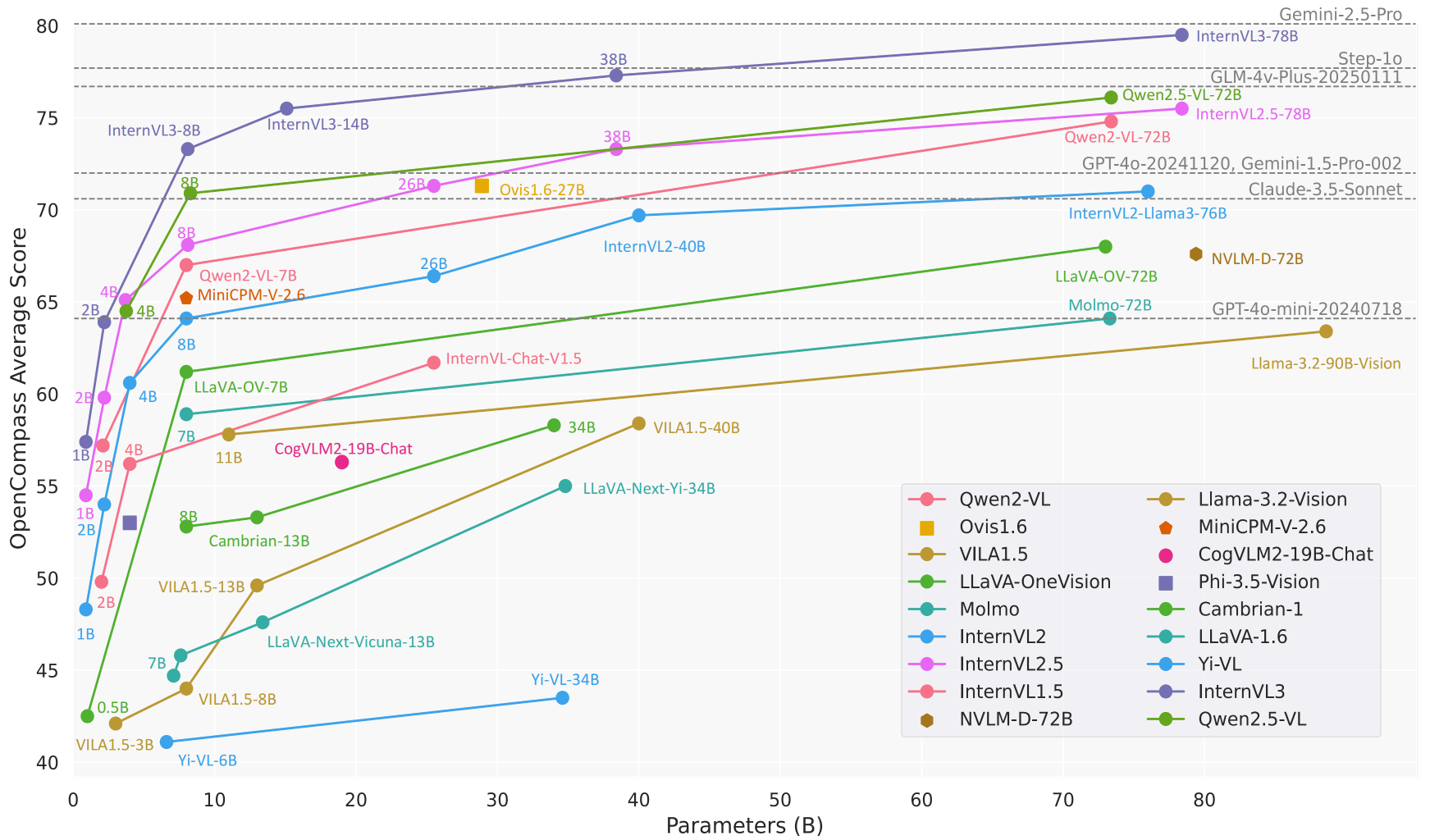 Comparison of InternVL3 performance on OpenCompass against other SOTA VLLMs. Taken from the original checkpoint.
このモデルは yonigozlan によって提供されました。 元のコードは こちら で確認できます。
use_kernels=Trueを from_pretrained() に設定すると、対応するレイヤーが Hub からの最適化されたカーネルに置き換えられます。詳細は カーネルの読み込み を参照してください。
使用例
Pipeline による推論
image-text-to-text パイプラインを使用して、わずか数行のコードでInternVL3モデルによる推論を実行する方法は以下の通りです。
from transformers import pipeline


messages = [
    {
        "role": "user",
        "content": [
            {
                "type": "image",
                "image": "https://huggingface.co/datasets/huggingface/documentation-images/resolve/main/bee.jpg",
            },
            {"type": "text", "text": "Describe this image."},
        ],
    },
]

pipe = pipeline("image-text-to-text", model="OpenGVLab/InternVL3-1B-hf")
outputs = pipe(text=messages, max_new_tokens=50, return_full_text=False)
outputs[0]["generated_text"]
'The image showcases a vibrant scene of nature, featuring several flowers and a bee. \n\n1. **Foreground Flowers**: \n   - The primary focus is on a large, pink cosmos flower with a prominent yellow center. The petals are soft and slightly r'
単一画像での推論
この例では、InternVLモデルでチャットテンプレートを使用して単一画像の推論を実行する方法を示します。
モデルはチャット用の特定のプロンプト形式で学習されています。プロンプトを正しくフォーマットするには、
processor.apply_chat_template(my_conversation_dict)を使用してください。
from transformers import AutoModelForImageTextToText, AutoProcessor


model_checkpoint = "OpenGVLab/InternVL3-1B-hf"
processor = AutoProcessor.from_pretrained(model_checkpoint)
model = AutoModelForImageTextToText.from_pretrained(model_checkpoint, device_map="auto")

messages = [
    {
        "role": "user",
        "content": [
            {"type": "image", "url": "http://images.cocodataset.org/val2017/000000039769.jpg"},
            {"type": "text", "text": "Please describe the image explicitly."},
        ],
    }
]

inputs = processor.apply_chat_template(messages, add_generation_prompt=True, tokenize=True, return_dict=True, return_tensors="pt").to(model.device)

generate_ids = model.generate(**inputs, max_new_tokens=50)
decoded_output = processor.decode(generate_ids[0, inputs["input_ids"].shape[1] :], skip_special_tokens=True)

decoded_output
'The image shows two cats lying on a pink blanket. The cat on the left is a tabby with a mix of brown, black, and white fur, and it appears to be sleeping with its head resting on the blanket. The cat on the'
テキストのみの生成
この例では、画像入力を提供せずにInternVLモデルでテキストを生成する方法を示します。
from transformers import AutoModelForImageTextToText, AutoProcessor


model_checkpoint = "OpenGVLab/InternVL3-1B-hf"
processor = AutoProcessor.from_pretrained(model_checkpoint)
model = AutoModelForImageTextToText.from_pretrained(model_checkpoint, device_map="auto")

messages = [
    {
        "role": "user",
        "content": [
            {"type": "text", "text": "Write a haiku"},
        ],
    }
]

inputs = processor.apply_chat_template(messages, add_generation_prompt=True, tokenize=True, return_dict=True, return_tensors="pt").to(model.device)

generate_ids = model.generate(**inputs, max_new_tokens=50)
decoded_output = processor.decode(generate_ids[0, inputs["input_ids"].shape[1] :], skip_special_tokens=True)

print(decoded_output)
"Whispers of dawn,\nSilent whispers of the night,\nNew day's light begins."
バッチ化された画像とテキストの入力
InternVLモデルは、バッチ処理された画像とテキストの入力もサポートしています。
from transformers import AutoModelForImageTextToText, AutoProcessor


model_checkpoint = "OpenGVLab/InternVL3-1B-hf"
processor = AutoProcessor.from_pretrained(model_checkpoint)
model = AutoModelForImageTextToText.from_pretrained(model_checkpoint, device_map="auto")

messages = [
    [
        {
            "role": "user",
            "content": [
                {"type": "image", "url": "https://huggingface.co/datasets/hf-internal-testing/transformers-synthetic-assets/resolve/main/images/llava_view.jpg"},
                {"type": "text", "text": "Write a haiku for this image"},
            ],
        },
    ],
    [
        {
            "role": "user",
            "content": [
                {"type": "image", "url": "https://www.ilankelman.org/stopsigns/australia.jpg"},
                {"type": "text", "text": "Describe this image"},
            ],
        },
    ],
]


inputs = processor.apply_chat_template(messages, padding=True, add_generation_prompt=True, tokenize=True, return_dict=True, return_tensors="pt").to(model.device)

output = model.generate(**inputs, max_new_tokens=25)

decoded_outputs = processor.batch_decode(output, skip_special_tokens=True)
decoded_outputs
["user\n\nWrite a haiku for this image\nassistant\nSilky lake,  \nWooden pier,  \nNature's peace.",
 'user\n\nDescribe this image\nassistant\nThe image shows a street scene with a traditional Chinese archway, known as a "Chinese Gate" or "Chinese Gate of']
バッチ化された複数画像の入力
このInternVLモデルの実装では、テキストごとに異なる数の画像を含むバッチ化されたテキストと画像の入力をサポートしています。
from transformers import AutoProcessor, AutoModelForImageTextToText
import torch

model_checkpoint = "OpenGVLab/InternVL3-1B-hf"
processor = AutoProcessor.from_pretrained(model_checkpoint)
model = AutoModelForImageTextToText.from_pretrained(model_checkpoint, device_map="auto")

messages = [
    [
        {
            "role": "user",
            "content": [
                {"type": "image", "url": "https://huggingface.co/datasets/hf-internal-testing/transformers-synthetic-assets/resolve/main/images/llava_view.jpg"},
                {"type": "text", "text": "Write a haiku for this image"},
            ],
        },
    ],
    [
        {
            "role": "user",
            "content": [
                {"type": "image", "url": "https://huggingface.co/datasets/hf-internal-testing/transformers-synthetic-assets/resolve/main/images/statue_of_liberty.jpg"},
                {"type": "image", "url": "https://huggingface.co/datasets/hf-internal-testing/transformers-synthetic-assets/resolve/main/images/dreamstime_golden_gate_flowers.jpg"},
                {"type": "text", "text": "These images depict two different landmarks. Can you identify them?"},
            ],
        },
    ],
]

inputs = processor.apply_chat_template(messages, padding=True, add_generation_prompt=True, tokenize=True, return_dict=True, return_tensors="pt").to(model.device)

output = model.generate(**inputs, max_new_tokens=25)

decoded_outputs = processor.batch_decode(output, skip_special_tokens=True)
decoded_outputs
["user\n\nWrite a haiku for this image\nassistant\nSilky lake,  \nWooden pier,  \nNature's peace.",
 'user\n\n\nThese images depict two different landmarks. Can you identify them?\nassistant\nYes, these images depict the Statue of Liberty and the Golden Gate Bridge.']
動画入力
InternVLモデルは、動画入力も処理できます。以下は、チャットテンプレートを使用して動画入力に対して推論を実行する方法の例です。
from transformers import AutoModelForImageTextToText, AutoProcessor, BitsAndBytesConfig


model_checkpoint = "OpenGVLab/InternVL3-8B-hf"
quantization_config = BitsAndBytesConfig(load_in_4bit=True)
processor = AutoProcessor.from_pretrained(model_checkpoint)
model = AutoModelForImageTextToText.from_pretrained(model_checkpoint, quantization_config=quantization_config, device_map="auto")

messages = [
    {
        "role": "user",
        "content": [
            {
                "type": "video",
                "url": "https://huggingface.co/datasets/hf-internal-testing/fixtures_videos/resolve/main/tennis.mp4",
            },
            {"type": "text", "text": "What type of shot is the man performing?"},
        ],
    }
]
inputs = processor.apply_chat_template(
    messages,
    return_tensors="pt",
    add_generation_prompt=True,
    tokenize=True,
    return_dict=True,
    num_frames=8,
).to(model.device)

output = model.generate(**inputs, max_new_tokens=25)

decoded_output = processor.decode(output[0, inputs["input_ids"].shape[1] :], skip_special_tokens=True)
decoded_output
'The man is performing a forehand shot.'
画像と動画のインターリーブされた入力
この例では、chat templateを使用して、画像と動画の入力が交互に並んだチャット会話のバッチをどのように処理するかを示しています。
from transformers import AutoProcessor, AutoModelForImageTextToText, BitsAndBytesConfig
import torch

model_checkpoint = "OpenGVLab/InternVL3-1B-hf"
processor = AutoProcessor.from_pretrained(model_checkpoint)
model = AutoModelForImageTextToText.from_pretrained(model_checkpoint, device_map="auto")

messages = [
    [
        {
            "role": "user",
            "content": [
                {"type": "image", "url": "https://huggingface.co/datasets/hf-internal-testing/transformers-synthetic-assets/resolve/main/images/statue_of_liberty.jpg"},
                {"type": "image", "url": "https://huggingface.co/datasets/hf-internal-testing/transformers-synthetic-assets/resolve/main/images/dreamstime_golden_gate_flowers.jpg"},
                {"type": "text", "text": "These images depict two different landmarks. Can you identify them?"},
            ],
        },
    ],
    [
        {
            "role": "user",
            "content": [
                {"type": "video", "url": "https://huggingface.co/datasets/hf-internal-testing/fixtures_videos/resolve/main/tennis.mp4"},
                {"type": "text", "text": "What type of shot is the man performing?"},
            ],
        },
    ],
    [
        {
            "role": "user",
            "content": [
                {"type": "image", "url": "https://huggingface.co/datasets/hf-internal-testing/transformers-synthetic-assets/resolve/main/images/llava_view.jpg"},
                {"type": "text", "text": "Write a haiku for this image"},
            ],
        },
    ],
]
inputs = processor.apply_chat_template(
    messages,
    padding=True,
    add_generation_prompt=True,
    tokenize=True,
    return_dict=True,
    return_tensors="pt",
).to(model.device)

outputs = model.generate(**inputs, max_new_tokens=25)

decoded_outputs = processor.batch_decode(outputs, skip_special_tokens=True)
decoded_outputs
['user\n\n\nThese images depict two different landmarks. Can you identify them?\nassistant\nThe images depict the Statue of Liberty and the Golden Gate Bridge.',
 'user\nFrame1: \nFrame2: \nFrame3: \nFrame4: \nFrame5: \nFrame6: \nFrame7: \nFrame8: \nWhat type of shot is the man performing?\nassistant\nA forehand shot',
 "user\n\nWrite a haiku for this image\nassistant\nSilky lake,  \nWooden pier,  \nNature's peace."]
InternVLVisionConfig
class transformers.InternVLVisionConfig
< source >( transformers_version: str | None = Nonearchitectures: list[str] | None = Noneoutput_hidden_states: bool | None = Falsereturn_dict: bool | None = Truedtype: str | torch.dtype | None = Nonechunk_size_feed_forward: int = 0is_encoder_decoder: bool = Falseid2label: dict[int, str] | dict[str, str] | None = Nonelabel2id: dict[str, int] | dict[str, str] | None = Noneproblem_type: Literal['regression', 'single_label_classification', 'multi_label_classification'] | None = Nonehidden_size: int = 1024num_hidden_layers: int = 24num_attention_heads: int = 16attention_bias: bool = Falseuse_qk_norm: bool = Falseintermediate_size: int = 4096hidden_act: str = 'gelu'hidden_dropout_prob: float | int = 0.0attention_dropout: float | int = 0.0projection_dropout: float | int = 0.0initializer_range: float = 0.02norm_type: str = 'layer_norm'layer_norm_eps: float = 1e-06image_size: int | list[int] | tuple[int, ...] = (448, 448)patch_size: int | list[int] | tuple[int, ...] = (14, 14)num_channels: int = 3use_mask_token: bool = Falseuse_absolute_position_embeddings: bool = Truelayer_scale_init_value: float = 0.1use_mean_pooling: bool = True )
パラメータ
- hidden_size (
int、任意、デフォルトは1024) — 隠れ表現の次元数。 - num_hidden_layers (
int、任意、デフォルトは24) — Transformer デコーダーの隠れ層の数。 - num_attention_heads (
int、任意、デフォルトは16) — Transformer デコーダーの各アテンション層におけるアテンションヘッドの数。 - attention_bias (
bool、任意、デフォルトはFalse) — 自己注意機構において、クエリ、キー、バリュー、出力の投影層にバイアスを使用するかどうかを指定します。 - use_qk_norm (
bool、省略可、デフォルトはFalse) — アテンションでクエリ・キー正規化を使用するかどうか。 - intermediate_size (
int、任意、デフォルトは4096) — MLP 表現の次元数。 - hidden_act (
str、任意、デフォルトはgelu) — デコーダーで使用する非線形活性化関数(関数または文字列)。例えば、"gelu"、"relu"、"silu"など。 - hidden_dropout_prob (
Union[float, int]、任意、デフォルト値は0.0) — embeddings、encoder、pooler 内のすべての全結合層における dropout 確率です。 - attention_dropout (
Union[float, int]、任意、デフォルトは0.0) — アテンション確率のドロップアウト率です。 - projection_dropout (
float、任意、デフォルト値は 0.0)— projection 層の Dropout 確率です。 - initializer_range (
float、任意、デフォルトは0.02) — すべての重み行列を初期化するための truncated_normal_initializer の標準偏差です。 - norm_type (
str、任意、デフォルトは"layer_norm") — エンコーダーで使用する正規化の種類です。"layer_norm"または"rms_norm"を指定できます。 - layer_norm_eps (
float、任意、デフォルトは1e-06) — レイヤーノーマル層で使用する epsilon です。 - image_size (
Union[int, list[int], tuple[int, ...]]、任意、デフォルトは(448, 448)) — 各画像のサイズ(解像度)。 - patch_size (
Union[int, list[int], tuple[int, ...]]、任意、デフォルトは(14, 14)) — 各パッチのサイズ(解像度)。 - num_channels (
int、任意、デフォルトは3) — 入力チャネル数。 - use_mask_token (
bool、省略可、デフォルトはFalse) — マスクドイメージモデリングにマスクトークンを使用するかどうか - use_absolute_position_embeddings (
bool、任意、デフォルトはTrue) — 絶対位置埋め込みを使用するかどうか。 - layer_scale_init_value (
float、任意、デフォルトは0.1) — 自己アテンション層で使用するスケール値です。ベースモデルでは 0.1、大規模モデルでは 1e-6 を使用します。0 に設定すると、レイヤー スケールを無効にします。 - use_mean_pooling (
bool、任意、デフォルトはTrue) — 分類ヘッドを適用する前に、CLS トークンの最終隠れ状態を使用するのではなく、パッチの最終隠れ状態を平均プーリングするかどうかを指定します。
これは InternVLModel の設定を保存するための設定クラスです。指定された引数に基づいて Internvl モデルをインスタンス化し、モデルのアーキテクチャを定義するために使用されます。デフォルト値で設定をインスタンス化すると、OpenGVLab/InternVL3-1B-hf と同様の設定が得られます。
設定オブジェクトはPreTrainedConfigを継承し、モデルの出力を制御するために使用できます。詳細については、PreTrainedConfigのドキュメントを参照してください。
例:
>>> from transformers import InternVLVisionConfig, InternVLVisionModel

>>> # Initializing a InternVLVisionModel OpenGVLab/InternVL3-1B-hf style configuration
>>> configuration = InternVLVisionConfig()

>>> # Initializing a model (with random weights) from the OpenGVLab/InternVL3-1B-hf configuration
>>> model = InternVLVisionModel(configuration)

>>> # Accessing the model configuration
>>> configuration = model.config
InternVLConfig
クラス transformers.InternVLConfig
< source >( transformers_version: str | None = Nonearchitectures: list[str] | None = Noneoutput_hidden_states: bool | None = Falsereturn_dict: bool | None = Truedtype: str | torch.dtype | None = Nonechunk_size_feed_forward: int = 0is_encoder_decoder: bool = Falseid2label: dict[int, str] | dict[str, str] | None = Nonelabel2id: dict[str, int] | dict[str, str] | None = Noneproblem_type: Literal['regression', 'single_label_classification', 'multi_label_classification'] | None = Nonevision_config: dict | transformers.configuration_utils.PreTrainedConfig | None = Nonetext_config: dict | transformers.configuration_utils.PreTrainedConfig | None = Noneimage_token_id: int = 151667image_seq_length: int = 256downsample_ratio: float = 0.5projector_hidden_act: str = 'gelu'vision_feature_layer: int | list[int] = -1vision_feature_select_strategy: str = 'default'tie_word_embeddings: bool = True )
パラメータ
- vision_config (
Union[dict, ~configuration_utils.PreTrainedConfig]、任意) — ビジョンバックボーンの config オブジェクトまたは辞書です。 - text_config (
Union[dict, ~configuration_utils.PreTrainedConfig]、省略可) — テキストバックボーンの設定オブジェクトまたは辞書。 - image_token_id (
int、任意、デフォルトは151667) — 入力画像のプレースホルダーとして使用される画像トークンのインデックスです。 - image_seq_length (
int、任意、デフォルトは256) — 1つの画像埋め込みのシーケンス長。 - downsample_ratio (
float、省略可、デフォルト値は 0.5)— 画像をダウンサンプリングする倍率。 - projector_hidden_act (
str、任意、デフォルトはgelu) — マルチモーダルプロジェクターで使用する活性化関数です。 - vision_feature_layer (
Union[int, list[int]]、任意、デフォルトは-1) — 視覚特徴を選択するレイヤーのインデックスです。複数のインデックスが指定された場合、対応するインデックスの視覚特徴が連結されて視覚特徴が形成されます。 - vision_feature_select_strategy (
str、任意、デフォルトはdefault) — ビジョンバックボーンからビジョン特徴を選択するために使用される特徴選択戦略です。 - tie_word_embeddings (
bool、任意、デフォルトはTrue) — モデルのtied_weights_keysマッピングに従って重み埋め込みを共有するかどうかを指定します。
これは InternVLModel の設定を保存するための設定クラスです。指定された引数に基づいて Internvl モデルをインスタンス化し、モデルのアーキテクチャを定義するために使用されます。デフォルト値で設定をインスタンス化すると、OpenGVLab/InternVL3-1B-hf と同様の設定が得られます。
設定オブジェクトはPreTrainedConfigを継承し、モデルの出力を制御するために使用できます。詳細については、PreTrainedConfigのドキュメントを参照してください。
例:
>>> from transformers import InternVLForConditionalGeneration, InternVLConfig

>>> # Initializing a InternVL style configuration
>>> configuration = InternVLConfig()

>>> # Initializing a model (with random weights) from the OpenGVLab/InternVL3-1B-hf configuration
>>> model = InternVLForConditionalGeneration(configuration)

>>> # Accessing the model configuration
>>> configuration = model.config
InternVLVisionModel
class transformers.InternVLVisionModel
< source >( config: InternVLVisionConfig )
パラメータ
- config (InternVLVisionConfig) — モデルのパラメータをすべて含むモデル設定クラスです。設定ファイルで初期化しても、モデルに関連する重みは読み込まれず、設定のみが読み込まれます。モデルの重みをロードするには、from_pretrained() メソッドを参照してください。
特定のヘッドを付加せずに生の隠れ状態を出力する、素のInternvlモデル。
このモデルは PreTrainedModel を継承しています。すべてのモデルに実装されている汎用的なメソッド(ダウンロードや保存、入力埋め込みのリサイズ、ヘッドのプルーニングなど)については、スーパークラスのドキュメントを参照してください。
このモデルは、PyTorchのtorch.nn.Moduleのサブクラスでもあります。 通常のPyTorch Moduleとして使用し、一般的な使用方法や動作に関する詳細については、PyTorchのドキュメントを参照してください。
forward
< source >( pixel_values: Tensorbool_masked_pos: typing.Optional[torch.BoolTensor] = None**kwargs ) → InternVLVisionModelOutputWithPooling or tuple(torch.FloatTensor)
パラメータ
- pixel_values (
torch.Tensor、形状(batch_size, num_channels, image_size, image_size)) — 入力画像に対応するテンソルです。ピクセル値は GotOcr2ImageProcessor を使用して取得できます。詳細は GotOcr2ImageProcessor.call() を参照してください(InternVLProcessor は画像の処理に GotOcr2ImageProcessor を使用します)。 - bool_masked_pos (
torch.BoolTensor、shape(batch_size, num_patches)、任意) — Boolean masked positions。どの patch がマスクされているか(1)、されていないか(0)を示します。
戻り値
InternVLVisionModelOutputWithPooling または tuple(torch.FloatTensor)
InternVLVisionModelOutputWithPooling または、torch.FloatTensor のタプル(return_dict=False が渡された場合、または config.return_dict=False の場合)。設定(InternVLConfig)や入力に応じて、さまざまな要素で構成されます。
InternVLVisionModelのforwardメソッドは、__call__特殊メソッドをオーバーライドします。
この関数内でフォワードパスの手順を定義する必要がありますが、その後、この関数ではなく
Moduleインスタンスを呼び出すべきです。前者は前処理と後処理の実行を適切に処理するのに対し、後者はそれらを黙って無視するためです。
last_hidden_state (
torch.FloatTensor、shape(batch_size, sequence_length, hidden_size)) — モデルの最終層の出力における隠れ状態のシーケンス。pooler_output (
torch.FloatTensor、shape(batch_size, hidden_size)) — config.use_mean_pooling が True に設定されている場合、パッチトークンの最終層の隠れ状態の平均値([CLS] トークンを除く)を返します。False に設定されている場合、[CLS] トークンの最終的な隠れ状態が返されます。hidden_states (
tuple(torch.FloatTensor)、optional、output_hidden_states=Trueが渡された場合またはconfig.output_hidden_states=Trueの場合に返されます)—torch.FloatTensorのタプル(埋め込み層を持つモデルの場合、埋め込みの出力が 1 つ、各層の出力がそれぞれ 1 つずつ)で、形状は(batch_size, sequence_length, hidden_size)です。各層の出力におけるモデルのHidden-states、および任意の初期埋め込み出力。
attentions (
tuple(torch.FloatTensor)、optional、output_attentions=Trueが渡された場合またはconfig.output_attentions=Trueの場合に返されます)—torch.FloatTensorのタプル(各レイヤーごとに1つ)、形状は(batch_size, num_heads, sequence_length, sequence_length)。アテンションのsoftmax後のアテンション重み。自己アテンションヘッド内で加重平均を計算するために使用されます。
InternVLModel
class transformers.InternVLModel
< source >( config: InternVLConfig )
パラメータ
- config (InternVLConfig) — モデルのパラメータをすべて含むモデル設定クラスです。設定ファイルで初期化しても、モデルに関連する重みは読み込まれず、設定のみが読み込まれます。モデルの重みをロードするには、from_pretrained() メソッドを参照してください。
言語モデリングヘッドを備えず、ビジョンバックボーンと言語モデルから構成されるInternVLモデル。
このモデルは PreTrainedModel を継承しています。すべてのモデルに実装されている汎用的なメソッド(ダウンロードや保存、入力埋め込みのリサイズ、ヘッドのプルーニングなど)については、スーパークラスのドキュメントを参照してください。
このモデルは、PyTorchのtorch.nn.Moduleのサブクラスでもあります。 通常のPyTorch Moduleとして使用し、一般的な使用方法や動作に関する詳細については、PyTorchのドキュメントを参照してください。
forward
< source >( input_ids: typing.Optional[torch.LongTensor] = Nonepixel_values: typing.Optional[torch.FloatTensor] = Noneattention_mask: typing.Optional[torch.Tensor] = Noneposition_ids: typing.Optional[torch.LongTensor] = Nonepast_key_values: transformers.cache_utils.Cache | None = Noneinputs_embeds: typing.Optional[torch.FloatTensor] = Nonevision_feature_layer: int | list[int] | None = Nonevision_feature_select_strategy: str | None = Nonemm_encoder_outputs: dict[str, transformers.modeling_outputs.BaseModelOutputWithPooling] | None = None**kwargs: *<class 'transformers.utils.generic.TransformersKwargs'> ) → InternVLModelOutputWithPast or tuple(torch.FloatTensor)
パラメータ
- input_ids (
torch.LongTensorの形状(batch_size, sequence_length), 、省略可) — 語彙における入力シーケンスのトークンインデックスです。デフォルトではパディングは無視されます。インデックスはAutoTokenizerを使用して取得できます。詳細については、PreTrainedTokenizer.encode()およびPreTrainedTokenizer.call()を参照してください。
- pixel_values (
torch.FloatTensor、形状(batch_size, num_channels, image_size, image_size)、任意) — 入力画像に対応するテンソルです。ピクセル値は GotOcr2ImageProcessor を使用して取得できます。詳細については GotOcr2ImageProcessor.call() を参照してください(InternVLProcessor は画像の処理に GotOcr2ImageProcessor を使用します)。 - attention_mask (
torch.Tensorの形状(batch_size, sequence_length), 、任意) — パディングトークンのインデックスに対するアテンションを回避するためのマスク。[0, 1]:- マスクされていないトークンに対して1
- マスクされたトークンに対しては 0 です。
- position_ids (
torch.LongTensorの形状(batch_size, sequence_length), 、任意) — 各入力シーケンスのトークンが位置埋め込み内で占める位置のインデックス。範囲[0, config.n_positions - 1]. - past_key_values (
~cache_utils.Cache, 省略可) — 逐次デコードを高速化するために使用できる、事前計算された隠れ状態(自己アテンションブロックおよびクロスアテンションブロックのキーとバリュー)。通常、これはデコードの以前の段階でモデルが返したpast_key_valuesであり、use_cache=Trueまたはconfig.use_cache=True.入力として許可されるのは Cache インスタンスのみです。kv cache ガイドを参照してください。
past_key_valuesが渡されない場合、デフォルトで DynamicCache が初期化されます。モデルは、入力として与えられたのと同じキャッシュ形式を出力します。
past_key_valuesを使用する場合、すべてのinput_ids(形状(batch_size, sequence_length))ではなく、このモデルに過去のキー・バリュー状態が与えられていない未処理のinput_ids(形状(batch_size, unprocessed_length))のみを入力することになります。 - inputs_embeds (
torch.FloatTensor、形状(batch_size, sequence_length, hidden_size)、任意) —input_idsを渡す代わりに、埋め込み表現を直接渡すこともできます。これは、モデル内部の埋め込みルックアップ行列よりも、input_idsのインデックスを対応するベクトルに変換する方法をより細かく制御したい場合に有用です。 - vision_feature_layer (
Union[int, list[int]]、省略可) — 視覚特徴を選択するレイヤーのインデックスです。複数のインデックスが指定された場合、対応するインデックスの視覚特徴が連結されて視覚特徴が形成されます。 - vision_feature_select_strategy (
str, 任意) — ビジョンバックボーンからビジョン特徴を選択するために使用される特徴選択戦略です。"default"または"full"のいずれかになります。 - mm_encoder_outputs (
dict[str, ~modeling_outputs.BaseModelOutputWithPooling], 省略可) — キーがサポートされているモダリティ、値がそのモダリティのエンコード済み出力である辞書。各エンコード済み出力は、(pooler_output, 省略可:last_hidden_states, 省略可:hidden_states, 省略可:attentions)pooler_output(形状(batch_size, sequence_length, hidden_size), 省略可) からなるタプルです。pooler_outputは、エンコーダーのマルチモーダル特徴量をテキスト埋め込みにマージしたシーケンスです。
戻り値
InternVLModelOutputWithPast または tuple(torch.FloatTensor)
InternVLModelOutputWithPast または、torch.FloatTensor のタプル(return_dict=False が渡された場合、または config.return_dict=False の場合)。設定(InternVLConfig)や入力に応じて、さまざまな要素で構成されます。
InternVLModelのforwardメソッドは、__call__特殊メソッドをオーバーライドします。
この関数内でフォワードパスの手順を定義する必要がありますが、その後、この関数ではなく
Moduleインスタンスを呼び出すべきです。前者は前処理と後処理の実行を適切に処理するのに対し、後者はそれらを黙って無視するためです。
last_hidden_state (
torch.FloatTensor、shape(batch_size, sequence_length, hidden_size)) — モデルの最終層の出力における隠れ状態のシーケンス。past_key_valuesが使用されている場合、出力されるのは、形状(batch_size, 1, hidden_size)のシーケンスの最後の隠れ状態のみです。past_key_values (
Cache、任意、use_cache=Trueが渡された場合またはconfig.use_cache=Trueの場合に返されます) — Cache のインスタンスです。詳細については、kv cache ガイドを参照してください。逐次デコーディングを高速化するために使用できる(
past_key_values入力参照)、事前計算済みの隠れ状態(自己注意ブロックのキーとバリュー)が含まれます。hidden_states (
tuple(torch.FloatTensor)、optional、output_hidden_states=Trueが渡された場合またはconfig.output_hidden_states=Trueの場合に返されます)—torch.FloatTensorのタプル(埋め込み層を持つモデルの場合、埋め込みの出力が 1 つ、各層の出力がそれぞれ 1 つずつ)で、形状は(batch_size, sequence_length, hidden_size)です。各層の出力におけるモデルのHidden-states、および任意の初期埋め込み出力。
attentions (
tuple(torch.FloatTensor)、optional、output_attentions=Trueが渡された場合またはconfig.output_attentions=Trueの場合に返されます)—torch.FloatTensorのタプル(各レイヤーごとに1つ)、形状は(batch_size, num_heads, sequence_length, sequence_length)。アテンションのsoftmax後のアテンション重み。自己アテンションヘッド内で加重平均を計算するために使用されます。
image_hidden_states (
torch.FloatTensor、任意) — サイズが(batch_size, num_images, sequence_length, hidden_size)のtorch.FloatTensor。 ビジョンエンコーダーによって生成され、最後の隠れ状態を投影した後のモデルのimage_hidden_statesです。
get_image_features
< source >( pixel_values: FloatTensorvision_feature_layer: int | list[int] | None = Nonevision_feature_select_strategy: str | None = None**kwargs: *<class 'transformers.utils.generic.TransformersKwargs'> ) → BaseModelOutputWithPooling or tuple(torch.FloatTensor)
パラメータ
- pixel_values (
torch.FloatTensor、形状(batch_size, channels, height, width)) — 入力画像に対応するテンソルです。 - vision_feature_layer (
intまたはlist[int]) — 特徴量を抽出するレイヤーのインデックス、またはレイヤーインデックスのリストです。 - vision_feature_layer (
Union[int, list[int]]、省略可) — 視覚特徴を選択するレイヤーのインデックスです。複数のインデックスが指定された場合、対応するインデックスの視覚特徴が連結されて視覚特徴が形成されます。 - vision_feature_select_strategy (
str, 任意) — ビジョンバックボーンからビジョン特徴を選択するために使用される特徴選択戦略です。"default"または"full"のいずれかになります。
戻り値
BaseModelOutputWithPooling または tuple(torch.FloatTensor)
torch.FloatTensor のタプル(return_dict=False が渡された場合、または config.return_dict=False の場合)、または BaseModelOutputWithPooling。設定(InternVLConfig)や入力に応じて、さまざまな要素で構成されます。
ビジョンタワーから画像の最終隠れ状態を取得し、マルチモーダル投影を適用します。
last_hidden_state (
torch.FloatTensor、shape(batch_size, sequence_length, hidden_size)) — モデルの最終層の出力における隠れ状態のシーケンス。pooler_output (
torch.FloatTensor、shape(batch_size, hidden_size)) — 補助事前学習タスクに使用される層をさらに通して処理された後、シーケンスの最初のトークン(分類トークン)の最終層の隠れ状態。例えば、BERT 系のモデルでは、線形層と tanh 活性化関数を経て処理された後の分類トークンを返します。この線形層の重みは、事前学習中の次文予測(分類)目的から学習されます。hidden_states (
tuple(torch.FloatTensor)、optional、output_hidden_states=Trueが渡された場合またはconfig.output_hidden_states=Trueの場合に返されます)—torch.FloatTensorのタプル(埋め込み層を持つモデルの場合、埋め込みの出力が 1 つ、各層の出力がそれぞれ 1 つずつ)で、形状は(batch_size, sequence_length, hidden_size)です。各層の出力におけるモデルのHidden-states、および任意の初期埋め込み出力。
attentions (
tuple(torch.FloatTensor)、optional、output_attentions=Trueが渡された場合またはconfig.output_attentions=Trueの場合に返されます)—torch.FloatTensorのタプル(各レイヤーごとに1つ)、形状は(batch_size, num_heads, sequence_length, sequence_length)。アテンションのsoftmax後のアテンション重み。自己アテンションヘッド内で加重平均を計算するために使用されます。
InternVLForConditionalGeneration
クラス transformers.InternVLForConditionalGeneration
< source >( config: InternVLConfig )
パラメータ
- config (InternVLConfig) — モデルのパラメータをすべて含むモデル設定クラスです。設定ファイルで初期化しても、モデルに関連する重みは読み込まれず、設定のみが読み込まれます。モデルの重みをロードするには、from_pretrained() メソッドを参照してください。
ビジョンバックボーンと言語モデルで構成されるINTERNVLモデル。
このモデルは PreTrainedModel を継承しています。すべてのモデルに実装されている汎用的なメソッド(ダウンロードや保存、入力埋め込みのリサイズ、ヘッドのプルーニングなど)については、スーパークラスのドキュメントを参照してください。
このモデルは、PyTorchのtorch.nn.Moduleのサブクラスでもあります。 通常のPyTorch Moduleとして使用し、一般的な使用方法や動作に関する詳細については、PyTorchのドキュメントを参照してください。
forward
< source >( input_ids: typing.Optional[torch.LongTensor] = Nonepixel_values: typing.Optional[torch.FloatTensor] = Noneattention_mask: typing.Optional[torch.Tensor] = Noneposition_ids: typing.Optional[torch.LongTensor] = Nonepast_key_values: transformers.cache_utils.Cache | None = Noneinputs_embeds: typing.Optional[torch.FloatTensor] = Nonevision_feature_layer: int | list[int] | None = Nonevision_feature_select_strategy: str | None = Nonelabels: typing.Optional[torch.LongTensor] = Nonelogits_to_keep: typing.Union[int, torch.Tensor] = 0image_sizes: typing.Optional[torch.Tensor] = Nonemm_encoder_outputs: dict[str, transformers.modeling_outputs.BaseModelOutputWithPooling] | None = None**kwargs: *<class 'transformers.utils.generic.TransformersKwargs'> ) → InternVLCausalLMOutputWithPast or tuple(torch.FloatTensor)
パラメータ
- input_ids (
torch.LongTensorの形状(batch_size, sequence_length), 、省略可) — 語彙における入力シーケンスのトークンインデックスです。デフォルトではパディングは無視されます。インデックスはAutoTokenizerを使用して取得できます。詳細については、PreTrainedTokenizer.encode()およびPreTrainedTokenizer.call()を参照してください。
- pixel_values (
torch.FloatTensor、形状(batch_size, num_channels, image_size, image_size)、任意) — 入力画像に対応するテンソルです。ピクセル値は GotOcr2ImageProcessor を使用して取得できます。詳細については GotOcr2ImageProcessor.call() を参照してください(InternVLProcessor は画像の処理に GotOcr2ImageProcessor を使用します)。 - attention_mask (
torch.Tensorの形状(batch_size, sequence_length), 、任意) — パディングトークンのインデックスに対するアテンションを回避するためのマスク。[0, 1]:- マスクされていないトークンに対して1
- マスクされたトークンに対しては 0 です。
- position_ids (
torch.LongTensorの形状(batch_size, sequence_length), 、任意) — 各入力シーケンスのトークンが位置埋め込み内で占める位置のインデックス。範囲[0, config.n_positions - 1]. - past_key_values (
~cache_utils.Cache, 省略可) — 逐次デコードを高速化するために使用できる、事前計算された隠れ状態(自己アテンションブロックおよびクロスアテンションブロックのキーとバリュー)。通常、これはデコードの以前の段階でモデルが返したpast_key_valuesであり、use_cache=Trueまたはconfig.use_cache=True.入力として許可されるのは Cache インスタンスのみです。kv cache ガイドを参照してください。
past_key_valuesが渡されない場合、デフォルトで DynamicCache が初期化されます。モデルは、入力として与えられたのと同じキャッシュ形式を出力します。
past_key_valuesを使用する場合、すべてのinput_ids(形状(batch_size, sequence_length))ではなく、このモデルに過去のキー・バリュー状態が与えられていない未処理のinput_ids(形状(batch_size, unprocessed_length))のみを入力することになります。 - inputs_embeds (
torch.FloatTensor、形状(batch_size, sequence_length, hidden_size)、任意) —input_idsを渡す代わりに、埋め込み表現を直接渡すこともできます。これは、モデル内部の埋め込みルックアップ行列よりも、input_idsのインデックスを対応するベクトルに変換する方法をより細かく制御したい場合に有用です。 - vision_feature_layer (
Union[int, list[int]]、省略可) — 視覚特徴を選択するレイヤーのインデックスです。複数のインデックスが指定された場合、対応するインデックスの視覚特徴が連結されて視覚特徴が形成されます。 - vision_feature_select_strategy (
str, 任意) — ビジョンバックボーンからビジョン特徴を選択するために使用される特徴選択戦略です。"default"または"full"のいずれかになります。 - labels (
torch.LongTensor、shape(batch_size, sequence_length)、任意) — マスク言語モデリング損失を計算するためのラベルです。インデックスは[0, ..., config.vocab_size]の範囲内であるか、-100 である必要があります(input_idsの docstring を参照)。インデックスが-100に設定されたトークンは無視(マスク)され、損失は[0, ..., config.vocab_size]の範囲内のラベルを持つトークンに対してのみ計算されます。 - logits_to_keep (
Union[int, torch.Tensor]、省略可、デフォルトは0) —intの場合、最後のlogits_to_keepトークンについて logits を計算します。0の場合、すべてのinput_idsについて logits を計算します(特殊ケース)。生成には最後のトークンの logits だけで十分であり、そのトークンのみについて計算することでメモリを節約できます。これは、長いシーケンスや大規模な語彙サイズの場合に特に顕著な効果があります。torch.Tensorの場合、シーケンス長次元で保持するインデックスに対応する 1 次元テンソルである必要があります。これは、パックされたテンソル形式(バッチとシーケンス長を単一の次元にまとめた形式)を使用する場合に有用です。 - image_sizes (
torch.Tensor、形状(batch_size, 2)、任意) — バッチ内の各画像のサイズです。各画像について (高さ, 幅) の形式です。 - mm_encoder_outputs (
dict[str, ~modeling_outputs.BaseModelOutputWithPooling], 省略可) — キーがサポートされているモダリティ、値がそのモダリティのエンコード済み出力である辞書。各エンコード済み出力は、(pooler_output, 省略可:last_hidden_states, 省略可:hidden_states, 省略可:attentions)pooler_output(形状(batch_size, sequence_length, hidden_size), 省略可) からなるタプルです。pooler_outputは、エンコーダーのマルチモーダル特徴量をテキスト埋め込みにマージしたシーケンスです。
戻り値
InternVLCausalLMOutputWithPast または tuple(torch.FloatTensor)
InternVLCausalLMOutputWithPast、またはtorch.FloatTensorのタプル(return_dict=Falseが渡された場合、またはconfig.return_dict=Falseの場合)で、設定(InternVLConfig)や入力に応じて、さまざまな要素で構成されます。
InternVLForConditionalGenerationのforwardメソッドは、__call__特殊メソッドをオーバーライドします。
この関数内でフォワードパスの手順を定義する必要がありますが、その後、この関数ではなく
Moduleインスタンスを呼び出すべきです。前者は前処理と後処理の実行を適切に処理するのに対し、後者はそれらを黙って無視するためです。
loss (
torch.FloatTensor、shape(1,)、optional、labelsが指定された場合に返されます) — 言語モデリングの損失(次のトークン予測用)。logits (
torch.FloatTensor、shape(batch_size, sequence_length, config.vocab_size)) — 言語モデリングヘッドの予測スコア(SoftMax 適用前の各語彙トークンのスコア)。past_key_values (
Cache、任意、use_cache=Trueが渡された場合またはconfig.use_cache=Trueの場合に返されます) — Cache のインスタンスです。詳細については、kv cache ガイドを参照してください。逐次デコーディングを高速化するために使用できる(
past_key_values入力参照)、事前計算済みの隠れ状態(自己注意ブロックのキーとバリュー)が含まれます。hidden_states (
tuple[torch.FloatTensor]、optional、output_hidden_states=Trueが渡された場合またはconfig.output_hidden_states=Trueの場合に返される) —torch.FloatTensorのタプル(埋め込み層を持つモデルの場合、埋め込みの出力用が 1 つ、各層の出力用が 1 つずつ)で、形状は(batch_size, sequence_length, hidden_size)です。各層の出力におけるモデルのHidden-states、および任意の初期埋め込み出力。
attentions (
tuple[torch.FloatTensor]、optional、output_attentions=Trueが渡された場合またはconfig.output_attentions=Trueの場合に返されます) —torch.FloatTensorのタプル(各レイヤーごとに1つ)、形状は(batch_size, num_heads, sequence_length, sequence_length)。アテンションのsoftmax後のアテンション重み。自己アテンションヘッド内で加重平均を計算するために使用されます。
image_hidden_states (
torch.FloatTensor、任意) — サイズが(batch_size, num_images, sequence_length, hidden_size)のtorch.FloatTensor。 ビジョンエンコーダーによって生成され、最後の隠れ状態を投影した後のモデルのimage_hidden_statesです。
例:
>>> import torch
>>> from transformers import AutoProcessor, AutoModelForImageTextToText

>>> torch_device = "cuda"
>>> processor = AutoProcessor.from_pretrained("OpenGVLab/InternVL3-1B-hf")
>>> model = AutoModelForImageTextToText.from_pretrained(
...     "OpenGVLab/InternVL3-1B-hf", dtype=torch.bfloat16, device_map=torch_device
... )

>>> messages = [
...     {
...         "role": "user",
...         "content": [
...             {
...                 "type": "image",
...                 "url": "https://huggingface.co/datasets/hf-internal-testing/transformers-synthetic-assets/resolve/main/images/statue_of_liberty.jpg",
...             },
...             {
...                 "type": "image",
...                 "url": "https://huggingface.co/datasets/hf-internal-testing/transformers-synthetic-assets/resolve/main/images/dreamstime_golden_gate_flowers.jpg",
...             },
...             {"type": "text", "text": "These images depict two different landmarks. Can you identify them?"},
...         ],
...     },
... ]

>>> inputs = processor.apply_chat_template(messages, add_generation_prompt=True, tokenize=True, return_dict=True, return_tensors="pt").to(torch_device)
>>> generate_ids = model.generate(**inputs, max_new_tokens=200)
>>> print(processor.decode(generate_ids[0, inputs["input_ids"].shape[1] :], skip_special_tokens=True))
The images depict the Statue of Liberty and the Golden Gate Bridge.
get_image_features
< source >( pixel_values: FloatTensorvision_feature_layer: int | list[int] | None = Nonevision_feature_select_strategy: str | None = None**kwargs: *<class 'transformers.utils.generic.TransformersKwargs'> ) → BaseModelOutputWithPooling or tuple(torch.FloatTensor)
パラメータ
- pixel_values (
torch.FloatTensor、shape(batch_size, num_channels, image_size, image_size)) — 入力画像に対応するテンソルです。ピクセル値は GotOcr2ImageProcessor を使用して取得できます。詳細は GotOcr2ImageProcessor.call() を参照してください(InternVLProcessor は画像の処理に GotOcr2ImageProcessor を使用します)。 - vision_feature_layer (
Union[int, list[int]]、省略可) — 視覚特徴を選択するレイヤーのインデックスです。複数のインデックスが指定された場合、対応するインデックスの視覚特徴が連結されて視覚特徴が形成されます。 - vision_feature_select_strategy (
str, 任意) — ビジョンバックボーンからビジョン特徴を選択するために使用される特徴選択戦略です。"default"または"full"のいずれかになります。
戻り値
BaseModelOutputWithPooling または tuple(torch.FloatTensor)
torch.FloatTensor のタプル(return_dict=False が渡された場合、または config.return_dict=False の場合)、または BaseModelOutputWithPooling。設定(InternVLConfig)や入力に応じて、さまざまな要素で構成されます。
last_hidden_state (
torch.FloatTensor、shape(batch_size, sequence_length, hidden_size)) — モデルの最終層の出力における隠れ状態のシーケンス。pooler_output (
torch.FloatTensor、shape(batch_size, hidden_size)) — 補助事前学習タスクに使用される層をさらに通して処理された後、シーケンスの最初のトークン(分類トークン)の最終層の隠れ状態。例えば、BERT 系のモデルでは、線形層と tanh 活性化関数を経て処理された後の分類トークンを返します。この線形層の重みは、事前学習中の次文予測(分類)目的から学習されます。hidden_states (
tuple(torch.FloatTensor)、optional、output_hidden_states=Trueが渡された場合またはconfig.output_hidden_states=Trueの場合に返されます)—torch.FloatTensorのタプル(埋め込み層を持つモデルの場合、埋め込みの出力が 1 つ、各層の出力がそれぞれ 1 つずつ)で、形状は(batch_size, sequence_length, hidden_size)です。各層の出力におけるモデルのHidden-states、および任意の初期埋め込み出力。
attentions (
tuple(torch.FloatTensor)、optional、output_attentions=Trueが渡された場合またはconfig.output_attentions=Trueの場合に返されます)—torch.FloatTensorのタプル(各レイヤーごとに1つ)、形状は(batch_size, num_heads, sequence_length, sequence_length)。アテンションのsoftmax後のアテンション重み。自己アテンションヘッド内で加重平均を計算するために使用されます。
例:
>>> from PIL import Image
>>> from transformers import AutoProcessor, InternVLForConditionalGeneration

>>> model = InternVLForConditionalGeneration.from_pretrained("OpenGVLab/InternVL3-1B-hf")
>>> processor = AutoProcessor.from_pretrained("OpenGVLab/InternVL3-1B-hf")

>>> messages = [
...     {
...         "role": "user", "content": [
...             {"type": "image", "url": "https://huggingface.co/datasets/huggingface/documentation-images/resolve/main/pipeline-cat-chonk.jpeg"},
...             {"type": "text", "text": "Where is the cat standing?"},
...         ]
...     },
... ]

>>> inputs = processor.apply_chat_template(
...     messages,
...     tokenize=True,
...     return_dict=True,
...     return_tensors="pt",
...     add_generation_prompt=True
... )
>>> # Generate
>>> generate_ids = model.generate(**inputs)
>>> processor.batch_decode(generate_ids, skip_special_tokens=True)[0]
InternVLProcessor
class transformers.InternVLProcessor
< source >( image_processor = Nonetokenizer = Nonevideo_processor = Noneimage_seq_length: int = 256chat_template = None**kwargs )
パラメータ
- image_processor (
GotOcr2ImageProcessor) — 画像プロセッサは必須の入力です。 - tokenizer (
Qwen2Tokenizer) — トークナイザーは必須の入力です。 - video_processor (
InternVLVideoProcessor) — 動画プロセッサは必須の入力です。 - image_seq_length (
int、任意、デフォルトは 256) — 1 つの画像パッチごとに使用する画像トークンの数です。以下を満たすように設定する必要があります: image_seq_length = (config.image_size // config.patch_size) 2 * (config.scale_factor2) - chat_template (
str) — チャット内のメッセージのリストをトークン化可能な文字列に変換するための Jinja テンプレート。
画像プロセッサ、トークナイザー、および動画プロセッサを単一のプロセッサにラップするInternVLProcessorを構築します。
InternVLProcessor は、GotOcr2ImageProcessor、Qwen2Tokenizer、InternVLVideoProcessor のすべての機能を提供します。詳細については、~GotOcr2ImageProcessor、~Qwen2Tokenizer、~InternVLVideoProcessor を参照してください。
__call__
< source >( images: typing.Union[ForwardRef('PIL.Image.Image'), numpy.ndarray, ForwardRef('torch.Tensor'), list['PIL.Image.Image'], list[numpy.ndarray], list['torch.Tensor'], NoneType] = Nonetext: str | list[str] | list[list[str]] | None = Nonevideos: typing.Union[list['PIL.Image.Image'], numpy.ndarray, ForwardRef('torch.Tensor'), list[numpy.ndarray], list['torch.Tensor'], list[list['PIL.Image.Image']], list[list[numpy.ndarray]], list[list['torch.Tensor']], transformers.video_utils.URL, list[transformers.video_utils.URL], list[list[transformers.video_utils.URL]], transformers.video_utils.Path, list[transformers.video_utils.Path], list[list[transformers.video_utils.Path]], NoneType] = None**kwargs: *<class 'transformers.models.internvl.processing_internvl.InternVLProcessorKwargs'> ) → BatchFeature
パラメータ
- images (
Union[PIL.Image.Image, numpy.ndarray, torch.Tensor, list[PIL.Image.Image], list[numpy.ndarray], list[torch.Tensor]], 任意) — 前処理対象の画像です。ピクセル値が 0 から 255 の範囲にある単一の画像またはバッチを想定しています。ピクセル値が 0 から 1 の範囲にある画像を渡す場合は、do_rescale=Falseを設定してください。 - text (
Union[str, list[str], list[list[str]]]、省略可) — エンコード対象のシーケンスまたはシーケンスのバッチです。各シーケンスは文字列、または文字列のリスト(事前トークン化済み文字列)であることができます。事前トークン化済みの入力を渡す場合は、バッチ入力との曖昧さを避けるためにis_split_into_words=Trueを設定してください。 - videos (
Union[list[PIL.Image.Image], numpy.ndarray, torch.Tensor, list[numpy.ndarray], list[torch.Tensor], list[list[PIL.Image.Image]], list[list[numpy.ndarray]], list[list[torch.Tensor]], ~video_utils.URL, list[~video_utils.URL], list[list[~video_utils.URL]], ~video_utils.Path, list[~video_utils.Path], list[list[~video_utils.Path]]], 任意) — 前処理を行う動画です。ピクセル値が 0 から 255 の範囲にある、単一の動画またはバッチの動画を想定しています。ピクセル値が 0 から 1 の範囲にある動画を渡す場合は、do_rescale=Falseを設定してください。 - return_tensors (
strまたは TensorType, 省略可) — 設定すると、特定のフレームワークのテンソルを返します。使用可能な値は以下の通りです:'pt': PyTorchのtorch.Tensorオブジェクトを返します。'np': NumPyのnp.ndarrayオブジェクトを返します。
- **kwargs (ProcessingKwargs、任意) — 各モダリティ(テキスト、画像、動画、音声)の追加処理オプション。モデル固有のパラメータは上記にリストされています。サポートされている引数の完全なリストについては、TypedDictクラスを参照してください。
戻り値
以下のフィールドを持つBatchFeature:
- input_ids — モデルに与えるトークン ID のリスト。
textがNoneでない場合に返されます。 - attention_mask — モデルがどのトークンに注意を払うべきかを指定するインデックスのリスト(
return_attention_mask=Trueの場合、またはself.model_input_namesに“attention_mask”が含まれておりtextがNoneでない場合)。 - pixel_values — モデルに渡すピクセル値。
imagesがNoneでない場合に返されます。
InternVLVideoProcessor
class transformers.InternVLVideoProcessor
< source >( **kwargs: *<class 'transformers.models.internvl.video_processing_internvl.InternVLVideoProcessorInitKwargs'> )
InternVLVideoProcessor ビデオプロセッサを構築します。
sample_frames
< source >( metadata: VideoMetadatanum_frames: int | None = Nonefps: int | float | None = Noneinitial_shift: bool | float | int | None = None**kwargs ) → torch.Tensor
パラメータ
- metadata (
VideoMetadata) — 総再生時間、fps、総フレーム数などの情報が含まれる動画のメタデータ。 - num_frames (
int, 任意) — サンプリングするフレームの最大数。デフォルトはself.num_framesです。 - fps (
intまたはfloat、省略可) — 1 秒あたりにサンプリングするターゲットフレーム数。デフォルトはself.fpsです。 - initial_shift (
bool、floatまたはint、デフォルトはself.initial_shift) — フレームをサンプリングする際に適用する初期シフトです。Trueの場合、シフトは動画の中央からフレームがサンプリングされるように設定されます。
戻り値
torch.Tensor
動画フレームをサンプリングするためのインデックス。
0から総フレーム数までの範囲で、指定されたフレーム数を均等にサンプリングするデフォルトのサンプリング関数です。
メタデータとともにfpsが渡された場合、fpsフレーム/秒で均等にサンプリングされます。引数num_framesとfpsは排他的です。