
Instructions to use Lewdiculous/InfinityRP-v2-8B-GGUF-IQ-Imatrix with libraries, inference providers, notebooks, and local apps. Follow these links to get started.
- Libraries
- llama-cpp-python
How to use Lewdiculous/InfinityRP-v2-8B-GGUF-IQ-Imatrix with llama-cpp-python:
# !pip install llama-cpp-python from llama_cpp import Llama llm = Llama.from_pretrained( repo_id="Lewdiculous/InfinityRP-v2-8B-GGUF-IQ-Imatrix", filename="InfinityRP-v2-8B-F16.gguf", )
output = llm( "Once upon a time,", max_tokens=512, echo=True ) print(output)
- Notebooks
- Google Colab
- Kaggle
- Local Apps Settings
- llama.cpp
How to use Lewdiculous/InfinityRP-v2-8B-GGUF-IQ-Imatrix with llama.cpp:
Install from brew
brew install llama.cpp # Start a local OpenAI-compatible server with a web UI: llama-server -hf Lewdiculous/InfinityRP-v2-8B-GGUF-IQ-Imatrix:Q4_K_M # Run inference directly in the terminal: llama-cli -hf Lewdiculous/InfinityRP-v2-8B-GGUF-IQ-Imatrix:Q4_K_M
Install from WinGet (Windows)
winget install llama.cpp # Start a local OpenAI-compatible server with a web UI: llama-server -hf Lewdiculous/InfinityRP-v2-8B-GGUF-IQ-Imatrix:Q4_K_M # Run inference directly in the terminal: llama-cli -hf Lewdiculous/InfinityRP-v2-8B-GGUF-IQ-Imatrix:Q4_K_M
Use pre-built binary
# Download pre-built binary from: # https://github.com/ggerganov/llama.cpp/releases # Start a local OpenAI-compatible server with a web UI: ./llama-server -hf Lewdiculous/InfinityRP-v2-8B-GGUF-IQ-Imatrix:Q4_K_M # Run inference directly in the terminal: ./llama-cli -hf Lewdiculous/InfinityRP-v2-8B-GGUF-IQ-Imatrix:Q4_K_M
Build from source code
git clone https://github.com/ggerganov/llama.cpp.git cd llama.cpp cmake -B build cmake --build build -j --target llama-server llama-cli # Start a local OpenAI-compatible server with a web UI: ./build/bin/llama-server -hf Lewdiculous/InfinityRP-v2-8B-GGUF-IQ-Imatrix:Q4_K_M # Run inference directly in the terminal: ./build/bin/llama-cli -hf Lewdiculous/InfinityRP-v2-8B-GGUF-IQ-Imatrix:Q4_K_M
Use Docker
docker model run hf.co/Lewdiculous/InfinityRP-v2-8B-GGUF-IQ-Imatrix:Q4_K_M
- LM Studio
- Jan
- Ollama
How to use Lewdiculous/InfinityRP-v2-8B-GGUF-IQ-Imatrix with Ollama:
ollama run hf.co/Lewdiculous/InfinityRP-v2-8B-GGUF-IQ-Imatrix:Q4_K_M
- Unsloth Studio
How to use Lewdiculous/InfinityRP-v2-8B-GGUF-IQ-Imatrix with Unsloth Studio:
Install Unsloth Studio (macOS, Linux, WSL)
curl -fsSL https://unsloth.ai/install.sh | sh # Run unsloth studio unsloth studio -H 0.0.0.0 -p 8888 # Then open http://localhost:8888 in your browser # Search for Lewdiculous/InfinityRP-v2-8B-GGUF-IQ-Imatrix to start chatting
Install Unsloth Studio (Windows)
irm https://unsloth.ai/install.ps1 | iex # Run unsloth studio unsloth studio -H 0.0.0.0 -p 8888 # Then open http://localhost:8888 in your browser # Search for Lewdiculous/InfinityRP-v2-8B-GGUF-IQ-Imatrix to start chatting
Using HuggingFace Spaces for Unsloth
# No setup required # Open https://huggingface.co/spaces/unsloth/studio in your browser # Search for Lewdiculous/InfinityRP-v2-8B-GGUF-IQ-Imatrix to start chatting
- Docker Model Runner
How to use Lewdiculous/InfinityRP-v2-8B-GGUF-IQ-Imatrix with Docker Model Runner:
docker model run hf.co/Lewdiculous/InfinityRP-v2-8B-GGUF-IQ-Imatrix:Q4_K_M
- Lemonade
How to use Lewdiculous/InfinityRP-v2-8B-GGUF-IQ-Imatrix with Lemonade:
Pull the model
# Download Lemonade from https://lemonade-server.ai/ lemonade pull Lewdiculous/InfinityRP-v2-8B-GGUF-IQ-Imatrix:Q4_K_M
Run and chat with the model
lemonade run user.InfinityRP-v2-8B-GGUF-IQ-Imatrix-Q4_K_M
List all available models
lemonade list
My upload speeds have been cooked and unstable lately.
Realistically I'd need to move to get a better provider.
If you want and you are able to, you can support that endeavor and others here (Ko-fi). I apologize for disrupting your experience.
#llama-3 #roleplay
GGUF-IQ-Imatrix quants for Endevor/InfinityRP-v2-8B.
Back at it!
Lewdiculous: "Personally I still prefer the first version based on Mistral, this one hates asterisks."
These quants have been done after the fixes from llama.cpp/pull/6920.
Use KoboldCpp version 1.64 or higher.
Prompt formatting...
Alpaca prompt format recommended.
A safe starting SillyTavern preset can be found here (simple).
Original model information by the author:
The idea is the same as InfinityRP v1, but this one is Llama 3 with 16k ctx! Have fun...
Prompt format: Alpaca.
"You are now in roleplay chat mode. Engage in an endless chat, always with a creative response. Follow lengths very precisely and create paragraphs accurately. Always wait your turn, next actions and responses. Your internal thoughts are wrapped with ` marks."
User Message Prefix = ### Input:
Assistant Message Prefix = ### Response:
System Message Prefix = ### Instruction:
Turn on "Include Names" (optional)
Text Length: (use on your System Prompt or ### Response:)
Response: (length = medium) <- [tiny, micro, short, medium, long, enormous, huge, massive, humongous]
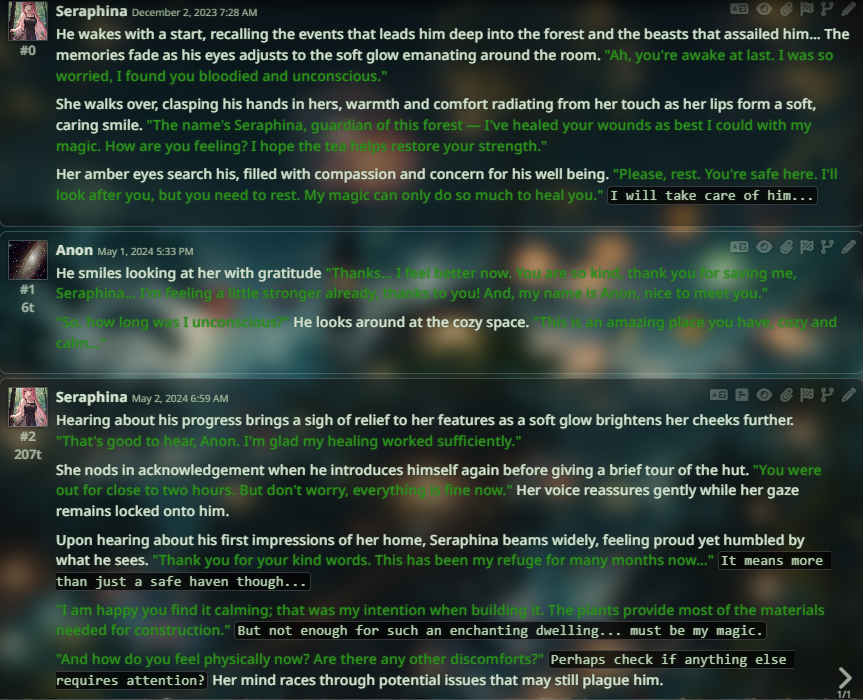
Example:
- Downloads last month
- 187
3-bit
4-bit
5-bit
6-bit
8-bit
16-bit

